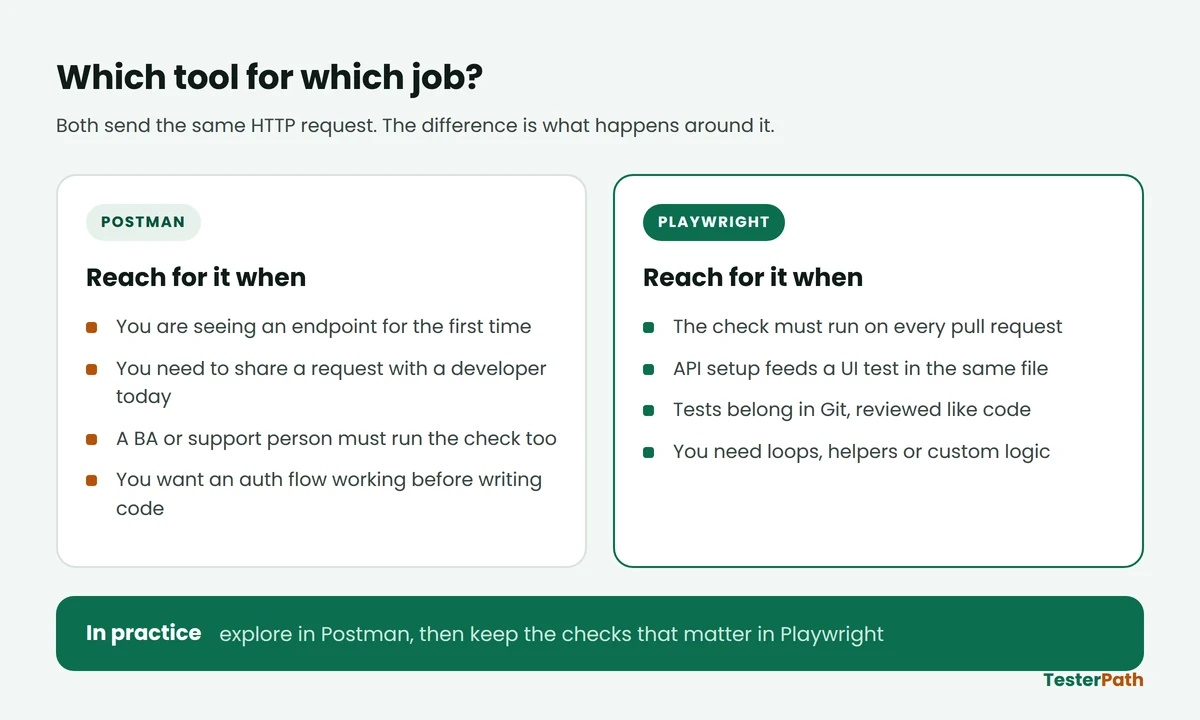
The short answer on Playwright vs Postman for API testing: Postman is faster for exploring an API and sharing a request with your team, and Playwright is better for keeping that same check running on every code change, inside Git, next to your other tests. Neither one replaces the other. In this guide we write the same four API checks twice, once as Postman tests and once as Playwright tests, against a small practice API you run on your own laptop. You need Node.js installed and very basic JavaScript. Nothing else.
Last tested on: Playwright Test 1.56.0 with Node.js 22.22.2, September 2026. The Postman scripts follow Postman’s current documentation, September 2026.
In short
- Use Postman when you are still figuring the API out, or when someone outside the automation team has to run the request.
- Use Playwright when the check has to run on every pull request, or when an API call is only the setup step for a UI test.
- The assertions themselves are almost identical. What changes is where the test lives, who can run it, and how you review a change to it.
- Postman ships its own Playwright integration now, so treating them as rivals is already a bit out of date.
What this guide covers
What each tool is actually for
Postman is an API client with a test runner attached. You build a request in a form, press Send, and read the response. If you want that response checked automatically, you write a few lines of JavaScript in the Post-response tab. Postman’s documentation puts it plainly: post-response scripts let you “run JavaScript after a request runs”, and the pm.test function takes a name and a function, with that name showing up in the test result output.
Playwright is a test framework from Microsoft that most people know for browser automation. It also ships an HTTP client that never opens a browser at all. The Playwright docs describe three jobs for it: testing server APIs, preparing server state before a UI test, and checking what the server received after the browser did something. That third one is the part people underrate.
Here is the practical difference. In Postman, the request is a saved object in a collection and the test is a script hanging off it. In Playwright, the request is a line of code inside a test file, and that file sits in your repository like any other source file. If words like endpoint, header and status code are still new, our QA basics guides cover those first.
Playwright vs Postman for API testing: the comparison that matters
Feature lists are easy to write and not very useful. These are the rows that actually change your day.
| What you are comparing | Postman | Playwright |
|---|---|---|
| Where a test lives | Inside a collection, exported as JSON | A .spec.ts file in your Git repo |
| Who can run it | Anyone who can install the app and click Send | Anyone comfortable running npm commands |
| Language of assertions | JavaScript in the Post-response tab | JavaScript or TypeScript with expect() |
| Running from a terminal | Newman, or the newer Postman CLI | npx playwright test, built in |
| Running many at once | Collection Runner iterations; performance runs use virtual users in parallel | Test files run in parallel across worker processes by default |
| Test data from a CSV | Built in, upload a data file to the Collection Runner | You read the file yourself in code |
| UI and API in one test | Possible through Postman’s Playwright integration | Native, the same request context shares cookies with the browser |
| Reviewing a change | Diffing an exported JSON file | A normal pull request diff |
| Time to first passing check | Minutes | Half an hour if JavaScript is new to you |
Read that table once more and notice something. Not one row is about which tool sends a better HTTP request. They both send the same request. Everything that differs is about the life of the test after you write it.
A practice API you can run on your own laptop
Most tutorials point you at a public demo API. That works until it rate-limits you, changes a field name, or starts asking for a key, and then a beginner spends the evening debugging a tool that was never broken. So we will run our own. Save this as practice-api.js. It uses nothing but what Node.js already gives you, so there is no install step.
practice-api.js (JavaScript)
// practice-api.js - a tiny practice API. No npm packages needed.
const http = require('http');

const TOKEN = 'demo-token-123';
const orders = {
  '1001': { orderId: 1001, restaurant: 'Sharma Tiffin', items: 3, amountPaise: 47500, status: 'PLACED' }
};

const send = (res, code, body) => {
  res.writeHead(code, { 'Content-Type': 'application/json' });
  res.end(JSON.stringify(body));
};

const server = http.createServer((req, res) => {
  const url = new URL(req.url, 'http://localhost:3000');

  if (req.method === 'POST' && url.pathname === '/login') {
    let raw = '';
    req.on('data', chunk => (raw += chunk));
    req.on('end', () => {
      const body = JSON.parse(raw || '{}');
      if (!body.username || !body.password) return send(res, 400, { error: 'username and password are required' });
      if (body.password !== 'Pass@123') return send(res, 401, { error: 'invalid credentials' });
      send(res, 200, { token: TOKEN, expiresIn: 900 });
    });
    return;
  }

  if (req.method === 'GET' && url.pathname.startsWith('/orders/')) {
    if (req.headers.authorization !== 'Bearer ' + TOKEN) return send(res, 401, { error: 'token missing or expired' });
    const order = orders[url.pathname.split('/')[2]];
    return order ? send(res, 200, order) : send(res, 404, { error: 'order not found' });
  }

  send(res, 404, { error: 'route not found' });
});

server.listen(3000, () => console.log('Practice API running on http://localhost:3000'));
Think of it as a stripped-down food delivery backend. You log in, you get a token that is good for 900 seconds, and you use that token to fetch an order. Amounts are in paise, which is how a lot of Indian payment APIs actually send money, and which is a very good source of bugs on its own.
Start it in one terminal and leave it running:
node practice-api.jsIn a second terminal, check it is alive. These are the real responses:
$ curl -s -X POST -H 'Content-Type: application/json' \
       -d '{"username":"ashish","password":"Pass@123"}' \
       http://localhost:3000/login
{"token":"demo-token-123","expiresIn":900}

$ curl -s -H 'Authorization: Bearer demo-token-123' http://localhost:3000/orders/1001
{"orderId":1001,"restaurant":"Sharma Tiffin","items":3,"amountPaise":47500,"status":"PLACED"}

$ curl -s http://localhost:3000/orders/1001
{"error":"token missing or expired"}
Four checks, then. A valid token returns the order. A missing token returns 401. A login without a password returns 400. An order id that does not exist returns 404. Now we write those four in both tools.
The four checks in Postman
Create a request, set the method and URL, and open the Post-response tab. This is the login request:
POST http://localhost:3000/login – Post-response script (JavaScript)
pm.test("Login returns 200", function () {
  pm.response.to.have.status(200);
});

pm.test("A token comes back and it is not empty", function () {
  const body = pm.response.json();
  pm.expect(body.token).to.be.a('string').and.not.empty;
  pm.collectionVariables.set("authToken", body.token);
});
The second block does the part beginners usually miss. It saves the token into a collection variable, so the next request can use {{authToken}} in its Authorization header instead of you pasting a token by hand every hour.
The order request is where the real assertions go:
GET http://localhost:3000/orders/1001 – Post-response script (JavaScript)
pm.test("Order is returned for a valid token", function () {
  pm.response.to.have.status(200);
});

pm.test("Amount and status are correct", function () {
  const order = pm.response.json();
  pm.expect(order.amountPaise).to.eql(47500);
  pm.expect(order.status).to.eql("PLACED");
});

pm.test("Response is JSON", function () {
  pm.expect(pm.response.headers.get('Content-Type')).to.include('application/json');
});
Press Send and the Test Results tab lists each name with a pass or fail beside it. That string you pass as the first argument is not decoration; Postman’s docs say it is exactly what shows up in the result output, which is why “Amount and status are correct” beats “test 2”.
To run the whole collection without clicking, you export it and use a command-line runner. Newman has been the usual answer for years and installs with npm install -g newman. Postman now also ships its own Postman CLI, which it describes as a signed, supported companion to the app, and there is a migration guide from Newman in the same docs. If you are setting up CI in 2026, check which one your team is already using before you pick.
The same four checks in Playwright
Start a project in an empty folder. The official command scaffolds the config, a sample test and the browsers:
npm init playwright@latestAnswer TypeScript when it asks. Then trim the generated config down to this, because for API tests you do not need a single browser setting:
playwright.config.ts (TypeScript)
import { defineConfig } from '@playwright/test';

export default defineConfig({
  testDir: './tests',
  reporter: [['list'], ['html', { open: 'never' }]],
  use: {
    baseURL: 'http://localhost:3000',
    extraHTTPHeaders: { Accept: 'application/json' },
  },
});
baseURL means every request in every test can be written as /orders/1001 instead of the full address. When your team moves from a local server to a QA server, you change one line here and nothing else.
tests/orders.spec.ts (TypeScript)
import { test, expect } from '@playwright/test';

let token: string;

test.beforeAll(async ({ request }) => {
  const login = await request.post('/login', {
    data: { username: 'ashish', password: 'Pass@123' },
  });
  expect(login.status()).toBe(200);
  token = (await login.json()).token;
});

test('order details come back for a valid token', async ({ request }) => {
  const res = await request.get('/orders/1001', {
    headers: { Authorization: `Bearer ${token}` },
  });
  expect(res.status()).toBe(200);
  const body = await res.json();
  expect(body.status).toBe('PLACED');
  expect(body.amountPaise).toBe(47500);
});

test('a missing token gives 401, not an empty 200', async ({ request }) => {
  const res = await request.get('/orders/1001');
  expect(res.status()).toBe(401);
  expect((await res.json()).error).toContain('token');
});

test('login without a password is rejected with 400', async ({ request }) => {
  const res = await request.post('/login', { data: { username: 'ashish' } });
  expect(res.status()).toBe(400);
});

test('an unknown order id returns 404', async ({ request }) => {
  const res = await request.get('/orders/9999', {
    headers: { Authorization: `Bearer ${token}` },
  });
  expect(res.status()).toBe(404);
});
Three lines are worth pausing on. { request } is Playwright’s built-in HTTP client, handed to your test without any setup. test.beforeAll logs in once and keeps the token for the whole file, instead of logging in four times. And data: sends the object as a JSON body, so you never hand-write a JSON string and then hunt for the missing comma.
With the practice API still running in the first terminal, run the tests in the second:
npx playwright testReal output from this run:
Running 4 tests using 1 worker

  ✓  1 tests/orders.spec.ts:13:5 › order details come back for a valid token (15ms)
  ✓  2 tests/orders.spec.ts:23:5 › a missing token gives 401, not an empty 200 (20ms)
  ✓  3 tests/orders.spec.ts:29:5 › login without a password is rejected with 400 (9ms)
  ✓  4 tests/orders.spec.ts:34:5 › an unknown order id returns 404 (7ms)

  4 passed (924ms)
Under a second for all four, and no browser was opened. Run npx playwright show-report and the same run appears as a web page you can send to anyone:
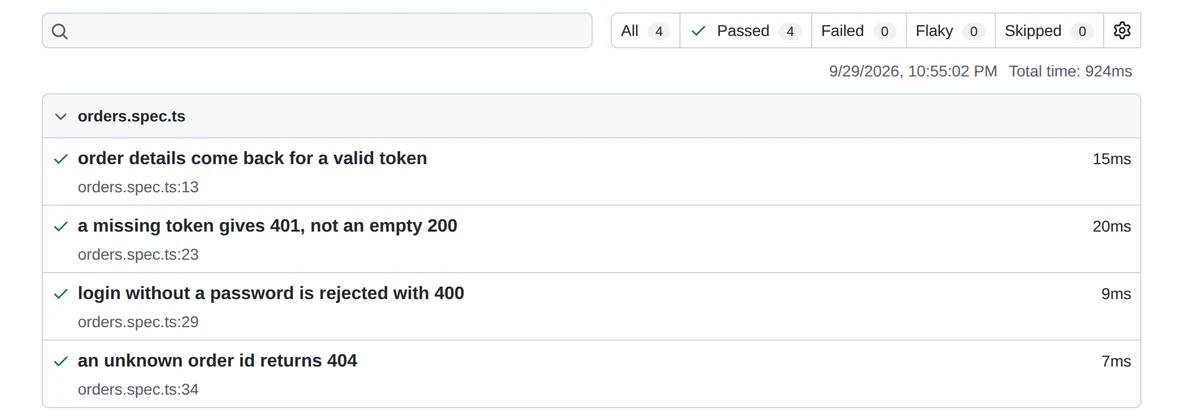
npx playwright show-report.What a failure looks like
A passing test tells you very little about a tool. The failure message is what you will read for the next two years. Change the expected amount to 50000 and run it again:
  1) failtest/fail.spec.ts:3:5 › order amount is 500 rupees ────────────────────

    Error: expect(received).toBe(expected) // Object.is equality

    Expected: 50000
    Received: 47500

      5 |   const token = (await login.json()).token;
      6 |   const res = await request.get('/orders/1001', { headers: { Authorization: `Bearer ${token}` } });
    > 7 |   expect((await res.json()).amountPaise).toBe(50000);
        |                                          ^
      8 | });

  1 failed
Expected, received, the exact line, and a caret under the failing call. Postman gives you the assertion message in the Test Results tab, which is enough for a small collection but gets harder to trace once one request has eight tests on it.
Is Playwright suitable for API testing?
Yes, and the docs say so in the first line of the API testing page. It is not a side feature bolted on later. But there are two honest limits worth knowing before you commit a whole suite to it.
First, the list of ready-made response assertions is short. Playwright’s APIResponse assertions page gives you toBeOK(), which checks the status is in the 200 to 299 range. Everything else you assert yourself on values you pull out of the response, the way we did above. That is more typing than pm.response.to.have.status(200), and some people genuinely prefer Postman’s shorter form.
Second, nobody outside the engineering team is going to run your Playwright suite. A support lead who wants to check one endpoint at 11pm will open Postman, not clone a repo. If that person exists on your project, you need Postman regardless of what your CI pipeline runs.
Why do teams move away from Postman, and why many do not
The complaint you hear most is about review, not about features. A collection is a JSON export. When a teammate changes an assertion, the pull request shows a wall of reordered JSON, and nobody can tell from the diff whether the change is safe. Playwright tests read as code, so a reviewer sees one changed line.
Against that, Postman does several things Playwright does not do for free. The Collection Runner takes a CSV or JSON data file and runs your requests once per row, which in Playwright is code you write yourself. It can schedule runs in the Postman cloud. And for load, Postman reuses the same collection with virtual users running in parallel, with your existing pm.test() assertions still firing under load.
There is also a change most comparison articles have not caught up with. In May 2026 Postman published a Playwright integration that runs browser tests and validates the API calls underneath them together, aimed at catching contract drift and silent backend errors. The two tools are drifting towards each other, not away.
Common mistakes testers make with API checks
1. Checking the status code and stopping there
A 200 only means the server answered. A broken order endpoint can happily return 200 with an empty object, a null amount, or yesterday’s data. Assert at least one value you care about in the body. In our example that is amountPaise, because a wrong amount on a payment screen is the bug that reaches Twitter.
2. Treating 401 and 403 as the same failure
They are not. MDN puts the line clearly: 401 means the request lacks valid authentication credentials, while 403 is returned when the credentials are valid but the client is not allowed to do that action. An expired OTP session should give 401. A normal user hitting an admin-only report should give 403. Teams mix these up constantly, and a test that accepts either one will not catch it.
3. Pasting a token into the request by hand
It works in the morning and fails at 6pm, and the failure looks like a product bug. Our practice API returns expiresIn: 900, which is fifteen minutes. Fetch the token in a setup step, every run. In Postman that is pm.collectionVariables.set(), in Playwright it is a beforeAll.
4. Committing a real key into the test
An exported Postman collection carries whatever you typed into it, including headers. A spec file pushed to a shared repo does the same. Use environment variables for anything that is a real credential, and keep the practice values obviously fake, the way demo-token-123 is.
5. Writing only happy-path tests
Three of our four checks are negative, and that ratio is not an accident. Missing field, missing token, unknown id, wrong data type, a number sent as a string. On most projects this is where the bugs are, because the happy path was the thing the developer tested before handing it over.
6. Opening a browser you do not need
A common beginner pattern in Playwright is to use page.request inside a test that also takes page, which starts a browser for a test that never looks at one. Take { request } on its own and the test stays a plain HTTP call. This is worth doing if only for the run time, which is why the four tests above finished in under a second.
What the official docs say
Worth reading the primary sources rather than trusting a comparison post, including this one.
Playwright. The API testing page states that Playwright can be used to reach your application’s REST API, and lists testing the API, setting up state before a UI test, and checking the server afterwards. It also explains that a request context taken from the browser shares cookies both ways, which is the mechanism behind logging in through the API and then continuing in the browser. On speed, the parallelism page says test files run in parallel by default in independent worker processes, and that workers cannot talk to each other, so each test file has to stand on its own.
Postman. The test scripts documentation is the one to read first, and the test examples page has ready snippets for status codes, body values, headers and response time. For running collections outside the app, Postman documents both Newman and the newer Postman CLI.
Interview questions on Playwright vs Postman
These come up in QA interviews in India for automation roles, usually right after “have you done API testing”. Short, specific answers land better than a list of features. There is more of this in our interview prep guides.
When would you pick Postman over Playwright? When the API is new to me and I am still learning its shape, when a developer or BA needs to run the same request, or when I need a quick check today and there is no framework in the project yet.
How does Playwright send an API request without a browser? Through the request fixture, which gives the test an HTTP client. No browser is launched unless the test also asks for a page.
How do you handle a token that expires? Fetch it in a setup step that runs before the tests, store it in a variable, and never hardcode it. If the suite is long, refresh it rather than assume one token lasts the whole run.
What would you assert besides the status code? At least one business value from the body, the content type, and the shape of the error response for negative cases. For a payment API I would assert the amount and the currency unit, because a paise-versus-rupee mistake still returns 200.
Your team has 300 Postman tests. Would you migrate them? Not all at once. I would move the ones that need to run on every build, leave the exploratory ones in Postman, and stop adding new CI checks to the collection.
Frequently asked questions
Which is the best tool for API testing?
There is no single best one. Postman is the best place to explore an endpoint and share it with people who do not write code. Playwright is the better home for checks that must run automatically on every build. Pick per check, not per team, and expect to use both.
Is Playwright suitable for API testing?
Yes. Playwright’s own documentation lists API testing as a supported use, and the request fixture sends HTTP calls without opening a browser. The ready-made response assertions are limited to toBeOK, so you write the rest yourself on values pulled from the response body.
What is the best alternative to Postman for API testing?
It depends on what you are replacing. For code-based checks in a JavaScript project, Playwright is a natural fit. Java teams usually reach for REST Assured instead. If you only want a command-line runner for collections you already have, Newman or the Postman CLI keep your work as it is.
Why are people moving away from Postman?
Mostly because of review and version control. A collection is exported as JSON, so a changed assertion shows up as an unreadable diff, and the tests live outside the repository. Teams that already run everything through pull requests find code-based tests easier to own and easier to review.
Do I need to know JavaScript to use Playwright for API testing?
Some, but less than people expect. The four tests in this guide use variables, an async call and an equality check. If you can read a Postman post-response script, you already know enough to start, and TypeScript will point out most mistakes before you run anything.
Where to go next
If you only do one thing after reading this, do it with the practice API still running: add a fifth check. Send a login with the wrong password and assert 401, then send an order request with a token you have deliberately mangled and see what the server gives you. That second one is where most APIs get sloppy, and finding out is a ten-minute job in either tool. From there, move a check you already have in Postman into a spec file and put it in Git, so your first Playwright test is something your team already trusts. More on both in our API testing guides and the test automation section.
Sources
- Microsoft, Playwright – API testing (documentation, v1.56 series)
- Microsoft, Playwright – Parallelism (documentation)
- Microsoft, Playwright – APIResponseAssertions (API reference)
- Microsoft, Playwright – Installation (documentation)
- Microsoft, Playwright – Release notes (v1.63 was the current release when this was written)
- Postman – Write tests in Postman (documentation, 2026)
- Postman – Test script examples (documentation, 2026)
- Postman – Run collections with the Collection Runner (documentation, 2026)
- Postman – The Postman CLI (documentation, 2026)
- Postman – Test API performance (documentation, 2026)
- Postman Blog – Postman + Playwright: testing UI and API together (26 May 2026)
- Postman – newman (npm package page)
- MDN Web Docs – 401 Unauthorized (2026)
Tools and features change often. Check the official documentation for the version you are using.