Checklist2-page PDF
API testing checklist
Tick each box as you test an endpoint. Your ticks stay saved in this browser, so you can come back to them later.
0 of 0 checked
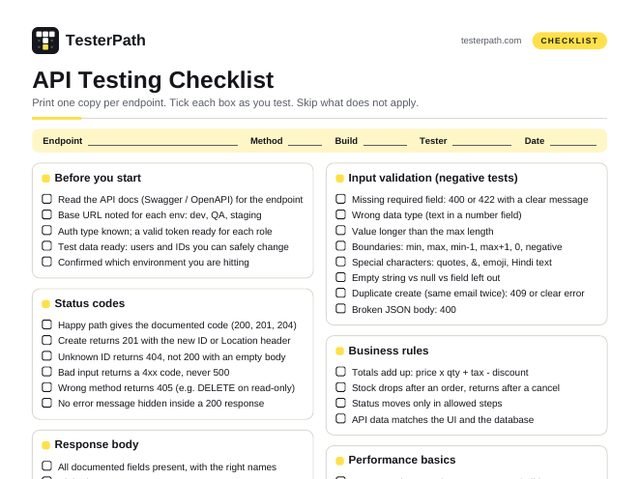
Before you start
- Read the API docs (Swagger / OpenAPI) for the endpoint
- Base URL noted for each env: dev, QA, staging
- Auth type known; a valid token ready for each role
- Test data ready: users and IDs you can safely change
- Confirmed which environment you are hitting
Status codes
- Happy path gives the documented code (200, 201, 204)
- Create returns 201 with the new ID or Location header
- Unknown ID returns 404, not 200 with an empty body
- Bad input returns a 4xx code, never 500
- Wrong method returns 405 (e.g. DELETE on read-only)
- No error message hidden inside a 200 response
Response body
- All documented fields present, with the right names
- Right data types:
25vs"25",truevs"true" - Null and empty values follow the docs
- Formats right: dates, emails, phone numbers, amounts
- Lists have the right count and sort order
- No extra sensitive data (passwords, tokens, other users)
Headers
- Content-Type is correct (e.g. application/json)
- Caching headers make sense (Cache-Control, ETag)
- CORS allows only expected sites (browser-called APIs)
Authentication and authorization
- No token: 401 Unauthorized
- Wrong or expired token: 401
- Valid token, wrong role: 403 Forbidden
- User A cannot see or edit User B’s data (swap the ID)
- Token sent in a header, never in the URL
- After logout, the old token stops working
Input validation (negative tests)
- Missing required field: 400 or 422 with a clear message
- Wrong data type (text in a number field)
- Value longer than the max length
- Boundaries: min, max, min-1, max+1, 0, negative
- Special characters: quotes, &, emoji, Hindi text
- Empty string vs null vs field left out
- Duplicate create (same email twice): 409 or clear error
- Broken JSON body: 400
Business rules
- Totals add up: price x qty + tax – discount
- Stock drops after an order, returns after a cancel
- Status moves only in allowed steps
- API data matches the UI and the database
Performance basics
- Response time noted; compare across builds
- Large lists are paginated (page + limit, or cursor)
- Huge page size (limit=100000) is capped or rejected
Idempotency and retries
- Same PUT twice: same final result, nothing extra
- Same DELETE twice: no 500 (expect 404 or 204)
- Same POST twice (double click): no duplicate record
- Timeout + retry does not create a double order
Security basics
' OR '1'='1in a field is rejected or saved as text<script>never comes back as live HTML- Errors show no stack trace, SQL or file path
- HTTPS only: plain HTTP redirected or refused
- Login and OTP endpoints are rate limited (429)
A full CRUD run (create, read, update, delete)
Chain the calls and pass the id from one step to the next. Most real API bugs show up between steps, not inside one call.
| STEP | REQUEST | EXPECT |
|---|---|---|
| 1 | POST /users with name and email | 201. Save the new id for the next steps |
| 2 | GET /users/{id} | 200. Same name and email you sent |
| 3 | PUT /users/{id} with a new name | 200 or 204 |
| 4 | GET /users/{id} | 200. Shows the new name, nothing else changed |
| 5 | DELETE /users/{id} | 204 or 200 |
| 6 | GET /users/{id} | 404. The user is really gone |
| 7 | DELETE /users/{id} again | 404, never 500 |
Test data for one field: email
Use the same pattern for every input: valid, missing, empty, wrong format, too long, wrong type, duplicate.
| SEND | EXPECT |
|---|---|
asha@example.com | Accepted |
field left out | 400 or 422, “email is required” |
null or "" | Same as missing, clear message |
asha@ or asha.example.com | Invalid format |
" asha@example.com " | Spaces trimmed, or rejected |
ASHA@example.com | Same user as asha@example.com |
256 characters | Rejected at the max length |
12345 (a number) | Type error, not a 500 |
same email twice | 409 or a clear duplicate error |
<b>asha</b>@x.com | Rejected, or stored as plain text |
Postman tests you can paste
Put these in the request’s Scripts > Post-response tab (called Tests in older versions).
pm.test("Status is 201", () => {
  pm.response.to.have.status(201);
});
pm.test("Answers in under 800 ms", () => {
  pm.expect(pm.response.responseTime)
    .to.be.below(800);
});
const body = pm.response.json();
pm.test("New user has a number id", () => {
  pm.expect(body.id).to.be.a("number");
});
pm.test("Email comes back as sent", () => {
  pm.expect(body.email)
    .to.eql("test.one@example.com");
});
// Keep the id for the next request: {{userId}}
pm.collectionVariables.set("userId", body.id);
Query params and pagination
- Each filter works alone and combined with others
- Unknown or misspelled param: ignored or a clear 400
- Sort works on each allowed field, both directions
- First page, last page, one past the last page
- page=0, page=-1, limit=0: handled, no 500
- No item repeated or missing across pages
Contract and versions
- Response matches the Swagger / OpenAPI schema
- Renaming or removing a field breaks apps: flag it
- Old version (/v1) still works if it is promised
Practice on: JSONPlaceholder (writes are faked), Restful Booker (auth and planted bugs), Swagger Petstore, httpbin.org, and ReqRes (free API key).
Tools
- Postman: collections and tests
- Playwright API testing: API tests in code
- curl -i: a quick check that shows headers
- DevTools Network tab: the real calls the UI makes