Cheat sheet3-page PDF
HTTP status codes cheat sheet
The codes you will meet while testing APIs and web pages, what each one means, and where it tells you to look.
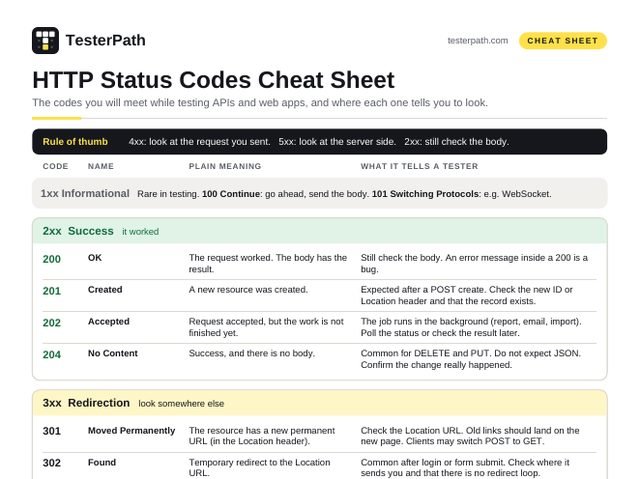
Rule of thumb: a 4xx code means look at the request you sent. A 5xx code means look at the server side. A 2xx code means it worked, but still check the body.
1xx Informational Rare in testing. 100 Continue: go ahead, send the body. 101 Switching Protocols: e.g. WebSocket.
2xx Success it worked
| Code | Name | Plain meaning | What it tells a tester |
|---|---|---|---|
| 200 | OK | The request worked. The body has the result. | Still check the body. An error message inside a 200 is a bug. |
| 201 | Created | A new resource was created. | Expected after a POST create. Check the new ID or Location header and that the record exists. |
| 202 | Accepted | Request accepted, but the work is not finished yet. | The job runs in the background (report, email, import). Poll the status or check the result later. |
| 204 | No Content | Success, and there is no body. | Common for DELETE and PUT. Do not expect JSON. Confirm the change really happened. |
3xx Redirection look somewhere else
| Code | Name | Plain meaning | What it tells a tester |
|---|---|---|---|
| 301 | Moved Permanently | The resource has a new permanent URL (in the Location header). | Check the Location URL. Old links should land on the new page. Clients may switch POST to GET. |
| 302 | Found | Temporary redirect to the Location URL. | Common after login or form submit. Check where it sends you and that there is no redirect loop. |
| 304 | Not Modified | Your cached copy is still valid, so no body is sent. | Not an error. Tick ‘Disable cache’ in DevTools to force a fresh 200. |
| 307 308 | Temporary / Permanent Redirect | Like 302 / 301, but the method and body must not change. | A POST stays a POST after the redirect. Check the Location URL. |
401 vs 403
401 Unauthorized: the server does not know who you are. Send a valid token or log in.
403 Forbidden: the server may know who you are, but you are not allowed to do this.
400 vs 422
400 Bad Request: the request itself is broken, e.g. invalid JSON or bad syntax.
422 Unprocessable Content: the request is well formed, but the data breaks a rule.
Many APIs use 400 for both. Follow what your API docs say.
Where to see the code
Postman: top right of the response pane, e.g. 200 OK, next to time and size.
Browser DevTools: press F12, open the Network tab, read the Status column.
curl: curl -i https://api.example.com/users
The first line shows it, e.g. HTTP/2 200
Headers that come with codes
Location: 201, 301, 302, 307, 308
WWW-Authenticate: 401
Allow: 405
Retry-After: 429, 503 (sometimes 3xx)
ETag / Last-Modified: lead to a 304 next time
4xx Client error check the request you sent
| Code | Name | Plain meaning | What it tells a tester |
|---|---|---|---|
| 400 | Bad Request | The server cannot process a malformed request (e.g. broken JSON). | Check the request: body syntax, required params, headers. The error should say what is wrong. |
| 401 | Unauthorized | Not authenticated: credentials are missing, wrong or expired. | Check the token or Authorization header. The reply should include a WWW-Authenticate header. |
| 403 | Forbidden | The server understood the request but refuses to allow it. | A role or permission issue. Logging in again with the same user will not help. |
| 404 | Not Found | Nothing at this URL, or the server will not reveal that it exists. | Check the path, the ID and the environment. Some APIs return 404 instead of 403 to hide data. |
| 405 | Method Not Allowed | The URL exists but does not support this method. | Check GET / POST / PUT / DELETE. The response must include an Allow header. |
| 408 | Request Timeout | The server did not receive the full request in time. | Look at the client or network side: a slow upload or a stalled connection. Not the same as 504. |
| 409 | Conflict | The request clashes with the current state of the resource. | Duplicate create, edit clash or version mismatch. The error should say what clashed. |
| 410 | Gone | It used to exist and has been removed for good. | Old API version or deleted content. Retrying will not help. |
| 413 | Content Too Large | The request body is bigger than the server accepts. | Test upload limits. The max size should be documented and the message should be friendly. |
| 415 | Unsupported Media Type | The server does not accept this body format. | Check the Content-Type header, e.g. application/json, not text/plain. |
| 422 | Unprocessable Content | The request is well formed, but the data breaks a rule. | Validation failed: invalid email, age too low, end date before start date. Read the field errors. |
| 429 | Too Many Requests | You sent too many requests in a given time (rate limit). | Look for a Retry-After header. A good sign on login and OTP endpoints. |
5xx Server error check the server, logs and services behind it
| Code | Name | Plain meaning | What it tells a tester |
|---|---|---|---|
| 500 | Internal Server Error | Something unexpected broke on the server. | Always worth a bug report. Add the request, time and any trace ID so devs can find it in the logs. |
| 502 | Bad Gateway | A gateway or proxy got an invalid response from the server behind it. | A backend service is down or crashing. Note which service and endpoint failed. |
| 503 | Service Unavailable | The server cannot handle it right now (overload or maintenance). | Usually temporary. Check Retry-After, ongoing deploys and maintenance windows. |
| 504 | Gateway Timeout | A gateway or proxy did not get a reply in time from the server behind it. | The backend is too slow. Note the endpoint and timing; a slow query or service is a common cause. |
A call failed? Put this in the bug report
- Method, full URL and environment
- Request headers and body (mask real tokens)
- Status code and response body, copied exactly
- Time of the call and any request or trace ID
- Expected vs actual code
- Steps to reproduce
Methods and the codes to expect
| METHOD | WHAT IT DOES | SAFE TO REPEAT? | USUAL SUCCESS | COMMON FAILURES |
|---|---|---|---|---|
GET | Reads data. Changes nothing. | Yes | 200 | 404 wrong ID, 401 no token |
POST | Creates something new, or runs an action. | No. Twice = two records | 201 (or 200) | 400, 409 duplicate, 422 invalid data |
PUT | Replaces the whole record. | Yes. Same result each time | 200 or 204 | 404, 400, 422 |
PATCH | Changes only the fields you send. | Depends on the API | 200 or 204 | 404, 422 |
DELETE | Removes the record. | Yes. Second call finds nothing | 204 or 200 | 404 on the second call, 403 |
Safe to repeat means sending the same request again leaves the data the same (the spec calls this idempotent). That is why a double click on a POST button can create two orders.
How to trigger each 4xx (negative tests)
| CODE | HOW TO GET IT IN A TEST | WHAT A GOOD API DOES |
|---|---|---|
400 | Send broken JSON, e.g. remove a closing } | Says the body could not be read |
401 | Remove the Authorization header, or use an expired token | Rejects the call; no data in the reply |
403 | Call an admin-only endpoint with a normal user’s token | Rejects it, even though you are logged in |
404 | Ask for an ID that does not exist, e.g. /users/999999 | 404 with a short message, not 200 with an empty body |
405 | Send DELETE to an endpoint that only reads | 405 and an Allow header listing the right methods |
409 | Create the same user (same email) twice | Second call fails with a clear reason |
413 | Upload a file bigger than the stated limit | Friendly message that names the limit |
415 | Send the body with Content-Type: text/plain | Asks for the right format |
422 | Valid JSON but bad data: email “abc”, age -5 | Lists which field failed and why |
429 | Hit login with a wrong password many times quickly | Blocks for a while; often sends Retry-After |
Common bugs to look for
200 with an error inside, like {"error": "failed"}. Monitoring and apps think it worked.
500 for bad input. A typo by the user should get a 4xx, not crash the server.
401 and 403 mixed up, or a wrong role getting data at all.
Stack trace or SQL in the error body. Users should never see it.
Code does not match the docs, e.g. 200 where Swagger says 201.
Codes in web page testing
Missing page: shows a friendly 404 page and returns 404, not 200 (a soft 404).
Moved page: old URL uses 301 to the new one, in one hop. Redirect chains slow pages and hurt SEO.
Login: after sign-in you land on the page you asked for (302/303), not always the home page.
Broken images and scripts: DevTools Network tab, filter by status, look for red 404 and 500 rows.
Practice: https://httpbin.org/status/404 returns whatever code you put at the end. Try 201, 302, 429 or 503 in Postman and see how the code, headers and body change.
Meanings follow RFC 9110 (HTTP Semantics); 429 comes from RFC 6585. Your API may use some codes a little differently, so check its docs.