TemplateWord · 2 pages
Bug report template
One clear form for every bug, a filled example of a real checkout bug, and a checklist to run before you submit.
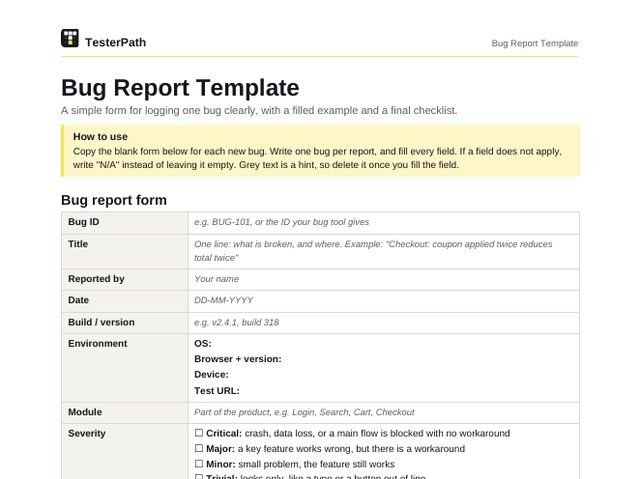
How to use this template. Copy the blank form below for each new bug. Write one bug per report, and fill every field. If a field does not apply, write “N/A” instead of leaving it empty. Grey text is a hint, so delete it once you fill the field.
Bug report form
| Bug ID | e.g. BUG-101, or the ID your bug tool gives |
|---|---|
| Title | One line: what is broken, and where. Example: “Checkout: coupon applied twice reduces total twice” |
| Reported by | Your name |
| Date | DD-MM-YYYY |
| Build / version | e.g. v2.4.1, build 318 |
| Environment | OS: Browser + version: Device: Test URL: |
| Module | Part of the product, e.g. Login, Search, Cart, Checkout |
| Severity | Critical: crash, data loss, or a main flow is blocked with no workaround Major: a key feature works wrong, but there is a workaround Minor: small problem, the feature still works Trivial: looks only, like a typo or a button out of line Severity = how badly the bug hurts the product. |
| Priority | P1 / High P2 / Medium P3 / Low P4 / Later Priority = how soon it should be fixed. Agree it with your lead. |
| Steps to reproduce | Start from a known point, like “Log in as…”. One action per step. |
| Test data used | Test login, product, coupon, amounts. Never real passwords or real card numbers. |
| Expected result | What should happen, as per the requirement. |
| Actual result | What really happened. Copy error messages word for word. |
| Evidence | Screenshot Video Logs Network response File names: |
| Frequency | Always Sometimes ( ___ of ___ tries) Happened once |
| Notes | Anything else that helps: workaround, related bug, first build where you saw it. |
| Status | New Open Fixed Retest Closed Reopened |
Example: a filled bug report
A realistic bug from a web shop, filled the way a reviewer likes to see it.
| Bug ID | BUG-214 |
|---|---|
| Title | Checkout page: same coupon code can be applied twice and the total is reduced twice |
| Reported by | Neha Verma (QA) |
| Date | 21-10-2026 |
| Build / version | Web v3.8.2, build 1147 (staging) |
| Environment | OS: Windows 11 Browser + version: Chrome 141 (64-bit) Device: Laptop, 1920 x 1080 Test URL: https://staging.shop.example.com/checkout |
| Module | Checkout > Coupons |
| Severity | Major. Checkout still works, but the order total is wrong. |
| Priority | P1 / High. Any customer can get a double discount, so the shop loses money on every such order. |
| Steps to reproduce |
|
| Test data used | User qa.buyer01 (test account). Product SKU TS-COT-M, Rs 1,000. Coupon SAVE10: 10% off, one use per order, minimum order Rs 500. |
| Expected result | The second Apply is blocked with the message “This coupon is already applied”. Discount stays Rs 100 and the total stays Rs 900. |
| Actual result | The second Apply is accepted and “Coupon applied” shows again. Discount becomes Rs 190 (Rs 100 + Rs 90) and the total drops to Rs 810. The order can be placed at Rs 810. |
| Evidence | 1. BUG-214_total_810.png (screenshot of the checkout total) 2. BUG-214_steps.mp4 (screen recording of all steps) 3. BUG-214_apply-coupon.har (POST /api/cart/apply-coupon returns 200 both times; no console errors) |
| Frequency | Always (5 of 5 tries) |
| Notes | On the Cart page the second Apply is blocked correctly. The problem is only on the Checkout page. Not checked on the mobile app yet. |
| Status | New |
Checklist before you submit
- Title says what is broken and where.
- Steps work from a fresh login.
- Only one bug in this report.
- Expected and actual results have exact values.
- Evidence is attached and clearly named.
- Searched the bug tool for duplicates first.
- Severity and priority chosen separately.
- No blame words. Describe the product, not people.