Cheat sheet2-page PDF
Locators cheat sheet: CSS, XPath, Playwright and Selenium
Find the right element every time. Every CSS selector, XPath and locator below was tried on the sample form shown first.
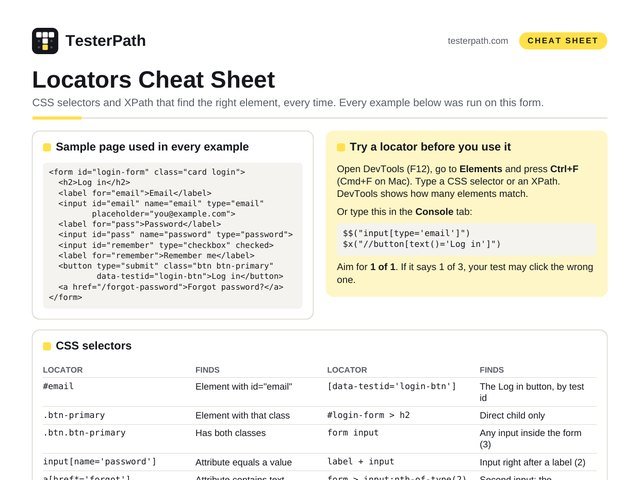
Sample page used in every example
<form id="login-form" class="card login">
  <h2>Log in</h2>
  <label for="email">Email</label>
  <input id="email" name="email" type="email"
         placeholder="you@example.com">
  <label for="pass">Password</label>
  <input id="pass" name="password" type="password">
  <input id="remember" type="checkbox" checked>
  <label for="remember">Remember me</label>
  <button type="submit" class="btn btn-primary"
          data-testid="login-btn">Log in</button>
  <a href="/forgot-password">Forgot password?</a>
</form>
Try a locator before you use it
Open DevTools (F12), go to Elements and press Ctrl+F (Cmd+F on Mac). Type a CSS selector or an XPath. DevTools shows how many elements match.
Or type this in the Console tab:
$$("input[type='email']")
$x("//button[text()='Log in']")
Aim for 1 of 1. If it says 1 of 3, your test may click the wrong one.
CSS selectors
| LOCATOR | FINDS |
|---|---|
#email | Element with id="email" |
.btn-primary | Element with that class |
.btn.btn-primary | Has both classes |
input[name='password'] | Attribute equals a value |
a[href*='forgot'] | Attribute contains text |
input[id^='em'] | Starts with … |
a[href$='password'] | Ends with … |
[data-testid='login-btn'] | The Log in button, by test id |
#login-form > h2 | Direct child only |
form input | Any input inside the form (3) |
label + input | Input right after a label (2) |
form > input:nth-of-type(2) | Second input: the password |
input:checked | Ticked checkbox or radio |
input:not([type='checkbox']) | Every input except the checkbox |
XPath
| LOCATOR | FINDS |
|---|---|
//input[@id='email'] | Attribute equals a value |
//button[text()='Log in'] | Exact text |
//*[text()='Log in'] | Finds 2: the heading and the button |
//button[normalize-space()='Log in'] | Text, ignoring extra spaces |
//a[contains(text(),'Forgot')] | Text contains |
//button[contains(@class,'btn-primary')] | Class contains |
//input[starts-with(@id,'em')] | Starts with … |
//input[@type='email' and @name='email'] | Two conditions |
(//input)[2] | Second input on the page |
//label[text()='Email']/following-sibling::input[1] | Input that comes after the Email label |
//input[@id='pass']/preceding-sibling::label[1] | Label just before the password box |
//button/parent::form | Go up one level (same as /..) |
//input[@id='email']/ancestor::form | Go up to any level |
Playwright: built-in locators
Playwright’s docs suggest these first, in roughly this order. They find elements the way a user sees them.
| CODE (JAVASCRIPT) | FINDS |
|---|---|
page.getByRole('button', { name: 'Log in' }) | Button by its visible name |
page.getByLabel('Email') | Input linked to that label |
page.getByPlaceholder('you@example.com') | Input by placeholder |
page.getByRole('link', { name: 'Forgot password?' }) | Link by its text |
page.getByRole('checkbox', { name: 'Remember me' }) | Checkbox by its label |
page.getByText('Forgot password?') | Any element by its text |
page.getByTestId('login-btn') | By data-testid |
page.locator('#email') | CSS or XPath when nothing else fits |
Selenium: the 8 By locators
Use with driver.findElement(...) (Java shown).
| CODE (JAVA) | FINDS |
|---|---|
By.id("email") | Fastest and clearest, if the id is stable |
By.name("password") | The name attribute |
By.className("btn-primary") | One class name only, no spaces |
By.cssSelector("button.btn-primary") | Any CSS selector |
By.xpath("//a[contains(text(),'Forgot')]") | Any XPath |
By.linkText("Forgot password?") | Link with this exact text |
By.partialLinkText("Forgot") | Link text contains |
By.tagName("form") | By tag |
A good locator…
- Uses what the user sees: a role, label or text
- Or a test id added for testing:
data-testid - Is short and matches exactly one element
- Still works after a design change
Avoid…
- Full paths:
/html/body/div[2]/div/form/button - Auto-made ids or classes:
css-1x9k2,react-select-3 - Index alone, like
(//button)[7] -
contains(@class,'btn'): also matches btn-primary, btn-link…
CSS or XPath?
CSS is shorter, easier to read and works everywhere. Use it by default.
XPath can match by visible text and can walk up to a parent. CSS can do neither.
No good locator at all? Ask the developers to add a data-testid. It is a small change.
“Element not found”? Check these
Not loaded yet. Playwright waits on its own. In Selenium use WebDriverWait, not Thread.sleep.
Inside an iframe. Switch to it first: driver.switchTo().frame() or page.frameLocator().
Inside a shadow DOM. Playwright CSS goes in on its own; Selenium needs getShadowRoot().
Two matches, one hidden, like a desktop and a mobile menu. Be more specific.