TemplateExcel · 3 sheets
Requirement traceability matrix (RTM) template
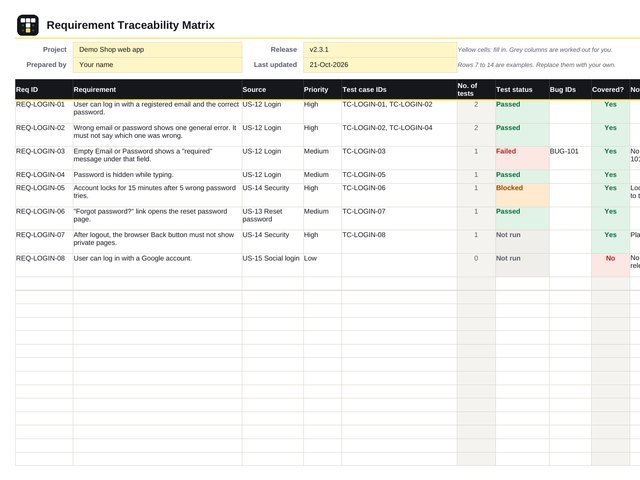
An Excel sheet with 8 example requirements from a login feature, linked to real test cases, plus a coverage summary that updates by itself.
What an RTM is for
An RTM is a table that answers one question: is every requirement tested? Each row is one requirement. Next to it you write the test cases that check it, how those tests went, and any bugs found. If a requirement has no test case, you can see the gap before the release, not after.
How to start
- Go to the RTM sheet and fill the light yellow cells at the top: project, release and your name.
- Read the 8 example rows for a Login feature. They match the examples in the TesterPath test case template. Replace them with your own.
- Add one requirement per row. Copy its ID and text from the user story, ticket or requirement document.
- In Test case IDs, list every test case that checks it, separated by commas: TC-LOGIN-01, TC-LOGIN-02
- After each test run, update Test status and Bug IDs. The Summary sheet updates by itself.
The 8 example rows a Login feature
They link to the test cases in the TesterPath test case template. Look at the last row: no test case yet, so it is not covered.
| Req ID | Requirement | Priority | Test case IDs | Test status | Bug IDs | Covered? |
|---|---|---|---|---|---|---|
REQ-LOGIN-01 | User can log in with a registered email and the correct password. | High | TC-LOGIN-01, TC-LOGIN-02 | Passed | — | Yes |
REQ-LOGIN-02 | Wrong email or password shows one general error. It must not say which one was wrong. | High | TC-LOGIN-02, TC-LOGIN-04 | Passed | — | Yes |
REQ-LOGIN-03 | Empty Email or Password shows a “required” message under that field. No message shown. Retest when BUG-101 is fixed. | Medium | TC-LOGIN-03 | Failed | BUG-101 | Yes |
REQ-LOGIN-04 | Password is hidden while typing. | Medium | TC-LOGIN-05 | Passed | — | Yes |
REQ-LOGIN-05 | Account locks for 15 minutes after 5 wrong password tries. Lock setting is off on QA. Dev team asked to turn it on. | High | TC-LOGIN-06 | Blocked | — | Yes |
REQ-LOGIN-06 | “Forgot password?” link opens the reset password page. | Medium | TC-LOGIN-07 | Passed | — | Yes |
REQ-LOGIN-07 | After logout, the browser Back button must not show private pages. Planned for the next test cycle. | High | TC-LOGIN-08 | Not run | — | Yes |
REQ-LOGIN-08 | User can log in with a Google account. No test case yet. Write one before the release. | Low | — | Not run | — | No |
The Summary sheet updates by itself
For the 8 examples, the coverage summary shows:
8Requirements
7Covered
1Not covered
88%Coverage
4Passed
1Failed
1Blocked
2Not run
“High priority, not covered” is 0 here. It must be zero before a release.
What each column means
| Req ID | A short unique ID for the requirement, like REQ-LOGIN-01 or the ticket number. |
|---|---|
| Requirement | One clear sentence that says what the app must do. |
| Source | Where the requirement comes from: user story, ticket, document and section. |
| Priority | How important it is for the business. Pick High, Medium or Low. |
| Test case IDs | The test cases that check this requirement, separated by commas. |
| No. of tests | Counted for you from the Test case IDs cell. Do not type here. |
| Test status | The overall result for this requirement. Pick it from the dropdown. |
| Bug IDs | Bugs found while testing this requirement. |
| Covered? | Yes if at least one test case is linked. Worked out for you. Do not type here. |
| Notes | Anything useful: reason for Blocked, a link, a retest date. |
Test status values
| Not run | No linked test has been run yet. |
|---|---|
| Passed | Every linked test passed. |
| Partly passed | Some linked tests passed, others are not run yet. |
| Failed | At least one linked test failed. Add the bug ID. |
| Blocked | Tests could not run, for example a setting or service was missing. |
Good to know
- Forward traceability: requirement → test cases. It shows that every requirement is tested.
- Backward traceability: test case → requirement. It shows that every test has a reason to exist.
- A requirement with many tests is not always well tested. Check that the tests cover both valid and invalid input.
- Keep the RTM up to date during the cycle. An RTM filled in only at the end does not help anyone.