Cheat sheet3-page PDF
SQL for testers cheat sheet
Queries testers use to check the data behind the screen. Every query runs on the small sample database shown first, so you can see exactly what it returns.
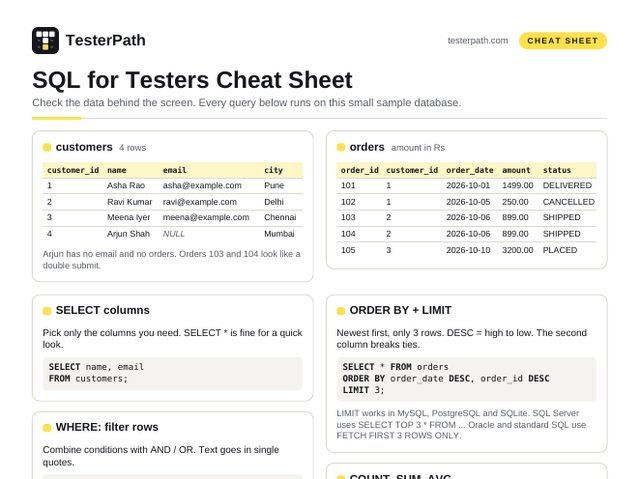
customers 4 rows
| customer_id | name | city | |
|---|---|---|---|
| 1 | Asha Rao | asha@example.com | Pune |
| 2 | Ravi Kumar | ravi@example.com | Delhi |
| 3 | Meena Iyer | meena@example.com | Chennai |
| 4 | Arjun Shah | NULL | Mumbai |
Arjun has no email and no orders. Orders 103 and 104 look like a double submit.
orders amount in Rs
| order_id | customer_id | order_date | amount | status |
|---|---|---|---|---|
| 101 | 1 | 2026-10-01 | 1499.00 | DELIVERED |
| 102 | 1 | 2026-10-05 | 250.00 | CANCELLED |
| 103 | 2 | 2026-10-06 | 899.00 | SHIPPED |
| 104 | 2 | 2026-10-06 | 899.00 | SHIPPED |
| 105 | 3 | 2026-10-10 | 3200.00 | PLACED |
SELECT columns
Pick only the columns you need. SELECT * is fine for a quick look.
SELECT name, email
FROM customers;
WHERE: filter rows
Combine conditions with AND / OR. Text goes in single quotes.
SELECT * FROM orders
WHERE status = 'SHIPPED' AND amount > 500;

SELECT * FROM customers
WHERE city = 'Pune' OR city = 'Delhi';
IN, BETWEEN, LIKE
IN = any value in a list. BETWEEN includes both ends. LIKE: % is any text, _ is one character.
SELECT * FROM orders
WHERE status IN ('PLACED', 'SHIPPED');

SELECT * FROM orders
WHERE order_date BETWEEN '2026-10-01'
                 AND '2026-10-07';

SELECT * FROM customers
WHERE email LIKE '%@example.com';
Date-time column? BETWEEN ... '2026-10-07' stops at midnight on the 7th. Use >= '2026-10-01' AND < '2026-10-08' instead.
Tip: ask for a read-only database login for daily checks. A SELECT never changes data, so you can explore safely.
ORDER BY + LIMIT
Newest first, only 3 rows. DESC = high to low. The second column breaks ties.
SELECT * FROM orders
ORDER BY order_date DESC, order_id DESC
LIMIT 3;
LIMIT works in MySQL, PostgreSQL and SQLite. SQL Server uses SELECT TOP 3 * FROM … Oracle and standard SQL use FETCH FIRST 3 ROWS ONLY.
COUNT, SUM, AVG
COUNT(*) counts rows. COUNT(column) skips NULLs.
SELECT COUNT(*)    AS order_count,
       SUM(amount) AS total,
       AVG(amount) AS avg_amount
FROM orders
WHERE status <> 'CANCELLED';
GROUP BY + HAVING
WHERE filters rows before grouping. HAVING filters the groups.
SELECT customer_id, COUNT(*) AS order_count
FROM orders
GROUP BY customer_id
HAVING COUNT(*) >= 2;
DISTINCT
Each value once. Good for spotting odd values like 'shipped' vs 'SHIPPED'.
SELECT DISTINCT status FROM orders;IS NULL
email = NULL never matches. Use IS NULL or IS NOT NULL.
SELECT * FROM customers
WHERE email IS NULL;   -- Arjun
INNER JOIN
Only rows that match in both tables.
SELECT c.name, o.order_id, o.amount
FROM customers c
INNER JOIN orders o
  ON o.customer_id = c.customer_id;
LEFT JOIN: customers with no orders
All customers, matched or not. No match = NULL order columns.
SELECT c.customer_id, c.name
FROM customers c
LEFT JOIN orders o
  ON o.customer_id = c.customer_id
WHERE o.order_id IS NULL;   -- Arjun
Subquery
Use the result of one query inside another.
SELECT name FROM customers
WHERE customer_id IN (
  SELECT customer_id FROM orders
  WHERE amount > 1000
);
Find duplicates
Same customer, date and amount twice? Often a double click or a retry.
SELECT customer_id, order_date, amount,
       COUNT(*) AS copies
FROM orders
GROUP BY customer_id, order_date, amount
HAVING COUNT(*) > 1;   -- 103 and 104
Tester's checks after placing an order
Find the newest order for that customer:
SELECT order_id, amount, status, order_date
FROM orders
WHERE customer_id = 1
ORDER BY order_id DESC
LIMIT 1;- The row exists, for the right customer
- amount matches the total shown in the UI (tax, discount)
- status is the expected first status, e.g. PLACED
- Only one row was created (run the duplicates query)
- Date and time look right (watch the time zone)
UPDATE and DELETE: handle with care
Only on a test database. Never on production. A missing WHERE changes or deletes every row.
| |
MySQL: START TRANSACTION; SQL Server: BEGIN TRANSACTION; PostgreSQL and SQLite: BEGIN;
The order SQL runs your query in
FROM / JOINWHEREGROUP BYHAVINGSELECTORDER BYLIMIT
You write SELECT first, but it runs fifth. That is why WHERE cannot use a column alias from SELECT, while ORDER BY can.
INSERT: add your own test data
Name the columns, so it still works if the table changes.
INSERT INTO customers
  (customer_id, name, email, city)
VALUES (5, 'Test User',
        'test@example.com', 'Pune');
Use names that clearly look like test data, so nobody mistakes them for real customers.
Data checks worth running
Bad data often hides behind a screen that looks fine.
-- Orders that point to no customer
SELECT o.order_id
FROM orders o
LEFT JOIN customers c
  ON c.customer_id = o.customer_id
WHERE c.customer_id IS NULL;

-- Blank or missing emails
SELECT customer_id, name
FROM customers
WHERE email IS NULL
   OR TRIM(email) = '';   -- Arjun

-- Values that should be impossible
SELECT * FROM orders
WHERE amount <= 0
   OR order_date > CURRENT_DATE;
Joins at a glance
INNER JOIN | Only rows that match in both tables |
|---|---|
LEFT JOIN | Every row from the left table, matched or not |
RIGHT JOIN | Every row from the right table. Most people flip the tables and use LEFT |
FULL JOIN | Everything from both sides. Not in MySQL |
UNION | Stacks two results and removes duplicate rows. UNION ALL keeps them |
Interview favourites
Second highest amount
SELECT MAX(amount) AS second_highest
FROM orders
WHERE amount < (SELECT MAX(amount)
                FROM orders);   -- 1499
Top customer by spend
SELECT c.name, SUM(o.amount) AS spent
FROM customers c
JOIN orders o
  ON o.customer_id = c.customer_id
WHERE o.status <> 'CANCELLED'
GROUP BY c.name
ORDER BY spent DESC
LIMIT 1;   -- Meena, 3200
Orders per city, including zero
SELECT c.city, COUNT(o.order_id) AS orders
FROM customers c
LEFT JOIN orders o
  ON o.customer_id = c.customer_id
GROUP BY c.city;   -- Mumbai shows 0
COUNT(o.order_id) gives 0 for Mumbai. COUNT(*) would wrongly give 1.
Text problems to spot
These pass a quick look but break search, login and reports.
-- Extra spaces before or after
SELECT * FROM customers
WHERE email <> TRIM(email);

-- Mixed case, e.g. 'shipped' vs 'SHIPPED'
SELECT * FROM orders
WHERE status <> UPPER(status);

-- Same email saved twice in any case
SELECT LOWER(email), COUNT(*)
FROM customers
GROUP BY LOWER(email)
HAVING COUNT(*) > 1;
NULL in 30 seconds
NULL means unknown, not zero and not empty text.
NULL = NULL is not true. Use IS NULL.
COUNT(*) counts every row. COUNT(email) skips NULLs. SUM and AVG skip them too.
Show a default instead: COALESCE(email, '(no email)')