Checklist2-page PDF
Mobile app testing checklist
For Android and iOS apps: installs, permissions, interruptions, networks and devices. Tick as you test; your ticks stay saved in this browser.
0 of 0 checked
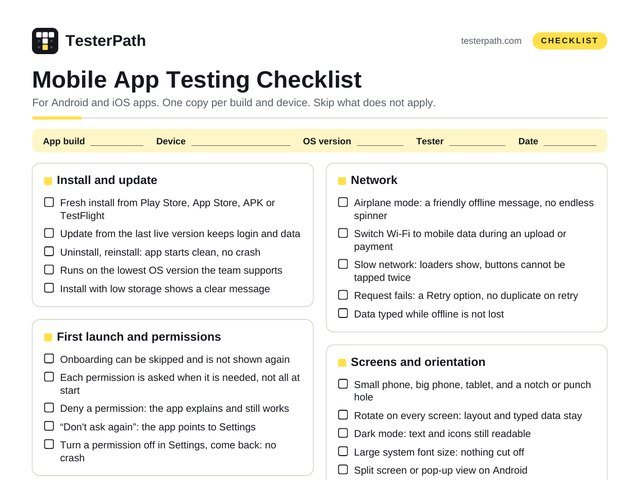
Install and update
- Fresh install from Play Store, App Store, APK or TestFlight
- Update from the last live version keeps login and data
- Uninstall, reinstall: app starts clean, no crash
- Runs on the lowest OS version the team supports
- Install with low storage shows a clear message
First launch and permissions
- Onboarding can be skipped and is not shown again
- Each permission is asked when it is needed, not all at start
- Deny a permission: the app explains and still works
- “Don’t ask again”: the app points to Settings
- Turn a permission off in Settings, come back: no crash
Interruptions
- Incoming call in the middle of a task
- SMS, WhatsApp or other notifications on top
- Lock and unlock the screen mid-flow
- Switch to another app and come back: same screen, same data
- Low battery popup and battery saver mode
- Kill the app from recent apps, open again
Push notifications
- Received when the app is open, in background and closed
- Tapping opens the right screen, even after login
- Notifications turned off: no crash, in-app info still shows
Network
- Airplane mode: a friendly offline message, no endless spinner
- Switch Wi-Fi to mobile data during an upload or payment
- Slow network: loaders show, buttons cannot be tapped twice
- Request fails: a Retry option, no duplicate on retry
- Data typed while offline is not lost
Screens and orientation
- Small phone, big phone, tablet, and a notch or punch hole
- Rotate on every screen: layout and typed data stay
- Dark mode: text and icons still readable
- Large system font size: nothing cut off
- Split screen or pop-up view on Android
Gestures and keyboard
- Tap, swipe, long press, pinch and pull to refresh
- Right keyboard opens: numbers for phone and OTP
- Keyboard never hides the field you are typing in
- Android Back button and iOS swipe back go to the right screen
- Double tap on a button does not submit twice
Speed, battery and crashes
- Cold start time noted; compare across builds
- One long session (30 min): no slowdown, no heating
- No crash or “app isn’t responding” dialog
- Battery and data use look normal for the task
Android and iOS: what is different
| ANDROID | IOS | |
|---|---|---|
| Going back | System Back button or back gesture | Swipe from the left edge, or the app’s back arrow |
| Permissions | “While using the app”, “Only this time”, “Don’t allow” | “Allow Once”, “Allow While Using App”, “Don’t Allow” |
| Notifications | Asked as a permission from Android 13 | Always asked before the first notification |
| Test builds | APK file, Play Console testing tracks, Firebase App Distribution | TestFlight |
| Logs | adb logcat, or Logcat in Android Studio | Console in Xcode, or the Console app on a Mac |
| Screen reader | TalkBack | VoiceOver |
Phone features
- Camera and gallery: allow, deny, cancel half way
- Location on and off; GPS with poor signal
- Fingerprint or face login, with PIN as a fallback
- OTP auto-read works, and manual entry works too
- Share, copy and links that open inside the app
Accessibility
- TalkBack (Android) and VoiceOver (iOS) read every button
- Tap targets about 48 dp on Android, 44 pt on iOS
- Large font and bold text settings do not break screens
- Colour is not the only way something is shown
Data and security
- Logout clears private data from the screen and cache
- Session expiry sends you to login without a crash
- No passwords or tokens in device logs
- Sensitive screens hidden in the recent apps view
Before you say “done”
- Device, OS version and app build noted in every bug
- Crash logs attached (adb logcat, Xcode, Crashlytics)
- Screen recording attached for gesture bugs
- Tested on at least one real Android and one real iPhone
Which devices to test on
You cannot test every phone. Cover these, then add the top devices from your app’s analytics.
| A low-cost Android | 3 or 4 GB RAM. Shows slowness and crashes first |
| A popular mid-range Android | Samsung, Xiaomi, Realme, vivo or OPPO. Each brand changes Android a little |
| The newest Android version | New permission and background rules land here |
| The oldest OS you support | Android and iOS, both |
| A recent iPhone and an older, smaller one | Notch, Dynamic Island and small-screen layouts |
| One tablet | Only if the app supports tablets |
Tools
- Android emulator: comes with Android Studio
- iOS Simulator: comes with Xcode on a Mac
- adb logcat: Android crash logs
- Real devices: your own phones or a device cloud