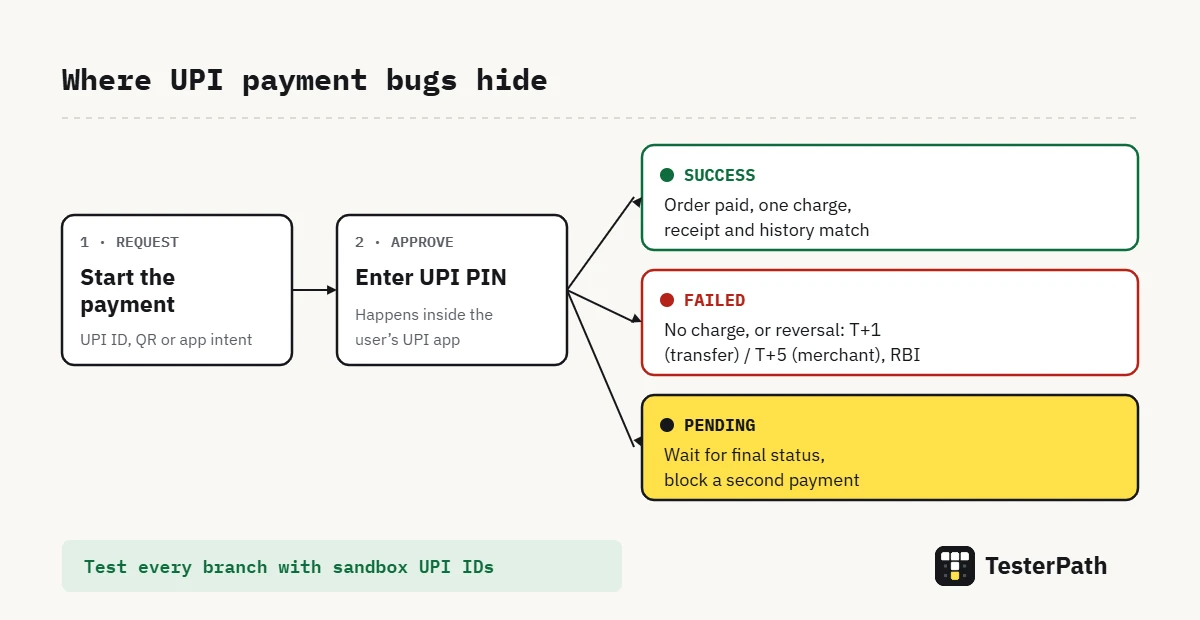
To test a UPI payment, follow the money from start to finish: the UPI ID or QR, the UPI PIN step, the final status (success, failure or pending), and what your app and the bank do after that. Good UPI payment test cases cover amount limits, a wrong PIN, timeouts, double taps and refunds, not just the happy path. In this guide you get ready test cases with examples, the sandbox UPI IDs that payment gateways publish, and the RBI reversal timelines to check against. You need a test environment from your payment gateway. No coding is needed.
Last checked on: NPCI UPI FAQs, the RBI turnaround-time circular (2019), and the Razorpay, Cashfree and PayU sandbox docs, October 2026.
In short
- Test the whole journey, not one screen: payment request, UPI PIN, final status, order status, receipt and refund.
- Use the gateway’s sandbox UPI IDs, such as
success@razorpayandfailure@razorpay, instead of real money. - Most serious UPI bugs hide in the pending state: money debited, app not sure, user tapping Pay again.
- Check refunds and reversals against the RBI timelines: T+1 day for a failed transfer, T+5 days for a failed merchant payment.
What this guide covers
What are you actually testing in a UPI payment?
Picture a food-delivery app. The user pays ₹349, the money leaves their bank account, and the app still shows “Payment failed”. They tap Pay again and get charged twice. Preventing exactly this is why UPI testing is more than checking a success screen.
A UPI payment passes through several systems: your app or website, the payment gateway, the user’s UPI app, NPCI and two banks. As a manual tester you cannot see inside most of them. What you can see, and must check, is what each of those systems shows the user and what your own app does with the result.
That gives four things to test on every payment. First, how the request starts: typed UPI ID, scanned QR or a tap that opens a UPI app (often called intent). Second, the approval step with the UPI PIN, which happens inside the user’s UPI app, not inside a merchant app like this one. Third, the final status the user sees. Fourth, what happens after: the order status, the receipt, notifications and, when something fails, the refund.
Before you start: test environment and sandbox UPI IDs
Do not test with real money unless your team has planned it. Payment gateways give a test mode, also called a sandbox, where fake UPI IDs return a fixed result. You enter one of them at checkout and the gateway behaves as if a real bank answered.
These are the test IDs the three big Indian gateways publish in their docs. Ask your developers which gateway your app uses and confirm the IDs in its current docs, because they do change.
| Gateway | Test UPI ID | What it simulates |
|---|---|---|
| Razorpay | success@razorpay | Successful payment |
| Razorpay | failure@razorpay | Failed payment |
| Cashfree | testsuccess@gocash | Successful payment |
| Cashfree | testfailure@gocash | Failed payment |
| Cashfree | testinvalid@gocash | Invalid UPI ID |
| Cashfree | testinvalidpin@gocash | Incorrect UPI PIN |
| Cashfree | testinsufficientfunds@gocash | Insufficient balance |
| Cashfree | testexpired@gocash | Session timed out |
| Cashfree | testtimeoutbank@gocash | Issuing bank timeout |
| PayU | anything@payu | Test UPI ID for collect flows (PayU does not list a fixed outcome) |
Cashfree’s list is the longest, with more than twenty failure reasons, which makes it handy for negative testing. One limitation is worth knowing early. Razorpay’s docs say that cancelling a UPI payment in test mode still ends as a successful payment, so a real “user cancelled” case can only be checked in live mode. Plan for that with your team instead of marking the case as passed.
UPI payment test cases with examples
The tables below use a food-delivery checkout with a ₹349 order. Swap in your own amounts and screens. For the format, the TesterPath test case template in Excel has the same columns.
Positive test cases
| ID | Scenario | Steps | Test data | Expected result | Type |
|---|---|---|---|---|---|
| UPI-01 | Pay by typing a UPI ID | Choose UPI, enter UPI ID, approve in sandbox | success@razorpay, ₹349 | Success screen; order moves to “Paid”; amount and order ID match | Positive |
| UPI-02 | Pay by scanning a QR | Open QR at checkout, scan with a UPI app, approve | Sandbox QR, if your gateway provides one; ₹349 | Merchant name and amount shown before PIN; success screen after | Positive |
| UPI-03 | Pay by opening a UPI app (intent) | Tap UPI app button on mobile, approve, return to app | Sandbox intent flow (PayU offers an intent simulator app), ₹349 | App returns to the order screen and shows success without a manual refresh | Positive |
| UPI-04 | Receipt and history | Complete UPI-01, open order history | – | Order shows amount, date, payment method and a transaction reference | Positive |
| UPI-05 | Second payment in same session | Pay one order, then place and pay a second | Two orders, ₹349 and ₹120 | Each order is charged once, with its own reference | Positive |
Negative test cases
Negative cases are where a sandbox earns its keep. Each of these needs only a different test UPI ID.
| ID | Scenario | Steps | Test data | Expected result | Type |
|---|---|---|---|---|---|
| UPI-06 | UPI ID in wrong format | Enter UPI ID without the @ part, tap Pay | ravi.sharma | Field error before any request goes out; Pay stays disabled or shows a clear message | Negative |
| UPI-07 | UPI ID that does not exist | Enter a well-formed but invalid ID | testinvalid@gocash | Clear “invalid UPI ID” message; no order marked as paid | Negative |
| UPI-08 | Wrong UPI PIN | Approve with wrong PIN in sandbox | testinvalidpin@gocash | Payment fails with a PIN message; user can retry; no debit shown | Negative |
| UPI-09 | Insufficient balance | Pay with low-balance test ID | testinsufficientfunds@gocash | Failure message names the reason; order stays unpaid; cart is not emptied | Negative |
| UPI-10 | Bank declines | Pay with failure test ID | failure@razorpay | Failure screen with retry option; no “Order placed” email or SMS from your app | Negative |
| UPI-11 | User closes the UPI app | Start payment, close the UPI app without paying | Live mode only (see sandbox note) | App shows a cancelled or pending state, never success | Negative |
Boundary test cases for the amount
NPCI’s UPI FAQs put the normal UPI limit at ₹1 lakh per transaction. Some categories, such as capital markets and insurance, go up to ₹2 lakh, and IPO and RBI Retail Direct payments up to ₹5 lakh. Your app may also set its own minimum and maximum, so ask for those numbers first. Then test both sides of each limit, which is what boundary value analysis means in practice.
| ID | Scenario | Test data | Expected result | Type |
|---|---|---|---|---|
| UPI-12 | Exactly the UPI limit | ₹1,00,000 | Allowed to reach the PIN step (if your app allows this amount) | Boundary |
| UPI-13 | One rupee above the limit | ₹1,00,001 | Blocked with a clear limit message before the UPI app opens | Boundary |
| UPI-14 | Your app’s minimum | Minimum set by your team, and one rupee below it | Minimum is accepted; the amount below it is blocked | Boundary |
| UPI-15 | Zero amount | ₹0 (via coupon or wallet covering the full order) | UPI step is skipped or blocked; no ₹0 request is sent | Boundary |
| UPI-16 | Paise in the amount | ₹349.50 | Amount shown and charged is exactly ₹349.50 in every screen | Boundary |
Pending, timeout and reversal cases
This is the part most UPI test case lists skip, and it is where real customers get hurt. A payment can sit in pending for a while because a bank or the network is slow. NPCI’s FAQ also says plainly that once a UPI payment is initiated, it cannot be stopped. Your app has to live with that.
RBI’s circular on failed-transaction turnaround time sets the rules your refund messages should match. If an account is debited but the beneficiary is not credited, the money must be reversed by T+1 day. If the account is debited but the merchant never gets confirmation, the reversal limit is T+5 days. Beyond those limits, the customer is owed ₹100 for each day of delay. You will not test the bank’s side, but you should test that your app tells the user the right thing.
| ID | Scenario | Steps | Test data | Expected result | Type |
|---|---|---|---|---|---|
| UPI-17 | Session timeout | Start payment, let the request expire | testexpired@gocash | App shows timed out or pending, not failed; no second charge on retry | Edge |
| UPI-18 | Bank timeout | Pay with bank-timeout test ID | testtimeoutbank@gocash | Order stays “payment pending”; app checks status again later instead of cancelling | Edge |
| UPI-19 | Double tap on Pay | Tap Pay twice quickly | success@razorpay, ₹349 | Only one payment request is created; one charge | Edge |
| UPI-20 | App killed after PIN | Approve, then force-close your app before it shows a result; reopen | Sandbox success ID | On reopen, the order shows the final status, not a fresh Pay button | Edge |
| UPI-21 | Network lost after approval | Approve, switch off mobile data, wait, switch on | Sandbox success ID | Status updates once the network returns; no duplicate order | Edge |
| UPI-22 | Failure message after debit | Simulate a failed merchant confirmation (ask devs for a test hook) | Team-provided test setup | Message says the amount, if debited, will be returned within the RBI timeline; support details shown | Edge |
A note on timing. MediaNama reported in 2025 that NPCI asked banks to call the status-check API only 90 seconds after the original transaction. In practice this means a pending payment may not change on screen in the first minute or so. Do not log a bug for that alone; log it when the app gives up, marks the order failed, or lets the user pay again while the first payment is still pending.
Refund test cases
| ID | Scenario | Steps | Expected result | Type |
|---|---|---|---|---|
| UPI-23 | Full refund after cancel | Pay, cancel order from app | Refund status shown with amount and an expected timeline; order shows “Refund initiated” | Positive |
| UPI-24 | Partial refund | Pay ₹349, cancel one item worth ₹120 | Exactly ₹120 refunded; remaining order unchanged | Positive |
| UPI-25 | Refund on a failed payment | Use failure test ID, then try to request refund | No refund option for a payment that never succeeded | Negative |
| UPI-26 | Two refund requests | Request refund, then request again before the first completes | Second request blocked; never refunds more than paid | Edge |
Security and UI checks
A few checks do not fit neatly in a table but catch real problems:
- A merchant app must never ask for the UPI PIN. The PIN is entered in the user’s UPI app (BHIM, a bank app or similar). A PIN field on a merchant screen is a critical bug.
- The amount on the UPI approval screen matches the order total, including taxes, delivery fee and discounts.
- The merchant name the user sees after scanning a QR is your business name, not a random string.
- Changing the cart total in another tab or device after the payment starts must not change what is charged.
- Full account numbers or UPI IDs are not shown in plain text on shared screens such as receipts or invoices, if your product rules say they should be masked.
Hands-on: run three cases in a sandbox
Here is how a tester typically runs the first checks once the developers share test keys. We have not run these against a live sandbox account for this article, because it needs your company’s own test keys. The steps and IDs follow the gateway docs linked above.
- Step 1: Confirm you are in test mode. Ask your developer, or check the gateway dashboard. Most show a “Test mode” label at the top.
- Step 2: Run UPI-01. Add a ₹349 item, choose UPI, enter
success@razorpayand approve. Note the order ID and the payment reference. - Step 3: Check three places. The success screen in the app, the order in your admin panel, and the payment in the gateway’s test dashboard. All three should agree on amount and status.
- Step 4: Run UPI-10 with
failure@razorpay. The order must stay unpaid, the cart should still be there, and no “order placed” message should go out. - Step 5: Run UPI-19. Tap Pay twice quickly on a fresh order. Then check the gateway dashboard: there should be one payment, not two.
When a case fails, write it up with the order ID, payment reference, time, test UPI ID and screenshots of each screen. Our bug report template with a filled example has a field for each of these.
Common mistakes when testing UPI payments
- Testing only the success screen. The order status, admin panel and gateway dashboard must agree. A green tick with an unpaid order is still a bug.
- Marking pending as failed. A pending payment can still succeed. If your app treats it as failed and lets the user pay again, you have a double-charge bug.
- Trusting test-mode cancellation. Razorpay’s test mode turns a cancel into a success. Test cancellation in live mode with a small, planned amount.
- Ignoring the user’s words. “Transaction failed” after money left the account scares people. Check that the message mentions the reversal timeline.
- Forgetting mobile behaviour. App switching, low network and killing the app are normal on phones. Our mobile app testing checklist lists the interruptions worth trying.
What the official docs say
NPCI’s UPI FAQs cover the basics testers need: per-transaction limits, the 4 to 6 digit UPI PIN, the fact that a wrong PIN entered several times can make the bank temporarily block sending money, and that a started payment cannot be stopped. RBI’s TAT circular RBI/2019-20/67 sets the T+1 and T+5 reversal limits and the ₹100 per day compensation. For sandbox testing, Razorpay, Cashfree and PayU each document their own test UPI IDs. PayU also points to a UPI intent simulator app for testing the intent flow. For test design, the ISTQB white paper on boundary value analysis explains how to choose values on and around each limit.
Interview questions on UPI payment testing
How would you test a UPI payment?
Start with the flows (UPI ID, QR, intent), then the final statuses (success, failure, pending), then what happens after: order status, receipt and refund. Use sandbox UPI IDs for each outcome and check the amount limits on both sides.
What is the most important negative case for UPI?
Money debited but the app shows failure, and the user pays again. It covers pending handling, duplicate prevention and the reversal message in one go.
How do you test without real money?
Use the payment gateway’s test mode and its published test UPI IDs, such as success@razorpay and failure@razorpay. Some cases, like user cancellation on Razorpay, still need a planned live test.
What should a refund test check?
The exact amount, the status the user sees, the expected timeline, and that the app never refunds more than was paid, even with two quick refund requests.
Frequently asked questions
How do you test UPI payments without real money?
Use your payment gateway’s test mode. Gateways such as Razorpay, Cashfree and PayU publish test UPI IDs that return a fixed result, for example success@razorpay for success and failure@razorpay for failure. Ask your developers for test keys and confirm the IDs in the gateway’s current docs.
What are the main test scenarios for UPI payment?
Cover the three ways to start a payment (UPI ID, QR and app intent), the three final statuses (success, failure and pending), amount limits, wrong PIN, insufficient balance, timeouts, double taps, app kill and refunds. Check that the order status always matches the payment status.
What is the UPI transaction limit for testing boundaries?
NPCI lists ₹1 lakh per transaction for normal UPI payments, ₹2 lakh for categories such as capital markets and insurance, and ₹5 lakh for IPO and RBI Retail Direct. Your app may have its own lower limits, so confirm them with your team before writing boundary cases.
What happens if money is debited but the UPI payment fails?
Under RBI’s turnaround-time rules, a failed transfer must be reversed by T+1 day, and a failed merchant payment by T+5 days, with ₹100 per day compensation after that. As a tester, check that your app shows a clear message with this timeline and never lets the user pay twice.
Is UPI payment testing manual or automated?
Both. Manual testing suits first-time checks, UI messages, app switching and live-mode cases like cancellation. Stable flows using sandbox IDs, such as success and failure, can later be automated. Many teams start manual and automate the regression cases once the flow settles.
Where to go from here
Pick one payment screen in your current project and run cases UPI-01, UPI-10, UPI-17 and UPI-19 in the sandbox this week. Those four alone cover success, failure, pending and double charging. If your app also calls the gateway’s API directly, our API testing checklist covers the backend side. More hands-on guides like this one are in the Manual Testing section.
Sources
- NPCI – UPI Frequently Asked Questions (2026)
- Reserve Bank of India – Harmonisation of Turn Around Time and customer compensation for failed transactions, RBI/2019-20/67 (2019)
- Razorpay Docs – Test UPI Details (2026)
- Cashfree Docs – Data to Test Integration (Payments) (2026)
- PayU Developer Docs – Test Cards, UPI ID and Wallets (2026)
- ISTQB – Boundary Value Analysis according to the ISTQB Foundation Level Syllabus (white paper, 2025)
- MediaNama – NPCI guidelines on UPI API usage for banks (2025)
Tools and features change often. Check the official documentation for the version you are using.
Test yourself on this topic
- Step 1 of the roadmapWhat to learn, and how to tell you are ready
- Software testing basics6 interview questions with answers
- Test case design8 interview questions with answers
- Bug reporting and defect tracking8 interview questions with answers
- Types of testing11 interview questions with answers
- Foundation practice test15 timed questions · Beginner