Playwright interview questions in 2026 check three things: whether you understand how Playwright waits for and finds elements, whether you can organise a suite with fixtures and config, and whether you can debug a failure that only happens in CI. Freshers mostly get concept questions. With 3 to 5 years of experience, expect design and scenario questions. Below, the questions are grouped by experience level, each with a plain answer and what the interviewer is really checking. The code samples run offline, so all you need is Node.js and basic JavaScript or TypeScript.
Last tested on: Playwright 1.56.0 with Chromium (all code samples run), answers checked against the Playwright 1.64 documentation, October 2026.
In short
- Freshers are asked about auto-waiting, locators, web-first assertions and browser contexts. Learn the why, not just the syntax.
- At 1 to 3 years, interviewers want fixtures, API mocking, saved login state, parallel runs and how you handle flaky tests.
- At 3 to 5 years, the questions turn into situations: a slow suite, a test that fails only in CI, or how you would set up a framework for a team.
- Know what changed recently. Test Agents, isolated retries, test locks and
locator.within()all arrived between versions 1.56 and 1.64.
What this guide covers
How a Playwright interview is usually structured
Most rounds follow the same shape, whatever the company. First a few questions to see if you have used Playwright or only read about it. Then one or two deeper topics picked from your CV. Then, for automation roles, a small live coding task. The table shows what usually changes with experience.
This pattern is common, but it is not a rule. A service company hiring ten automation testers runs a very different round from a product startup hiring one.
| Experience | Typical questions | What they are really checking |
|---|---|---|
| Fresher (0–1 year) | What is Playwright, auto-waiting, locators, assertions, headless mode | Do you understand why a test passes or fails, not just how to write one |
| 1–3 years | Fixtures, mocking, login state, parallel runs, retries, page objects | Can you keep a real suite stable and fast |
| 3–5 years | Framework design, CI failures, sharding, test data, reporting | Can you make decisions for a team and explain the trade-offs |
Playwright interview questions for freshers
Freshers are rarely asked trick questions. They are asked simple ones, and the follow-up “why?” is where most answers fall apart. Prepare these six well.
1. What is Playwright, and how is it different from Selenium?
Playwright is an open-source framework from Microsoft for testing web apps. One API drives Chromium, Firefox and WebKit, and it comes with its own test runner, so you get parallel runs, reports, retries and traces without adding other libraries. There are official versions for JavaScript/TypeScript, Python, Java and .NET.
Selenium talks to browsers through WebDriver, which the Selenium docs describe as a W3C Recommendation. It has been around much longer, has a very large community, and has bindings for more languages, Ruby among them. A fair answer is that Playwright gives you more built in, like waiting, tracing and network mocking, while Selenium is a standard many companies already have years of tests in. Don’t say one is simply “better”. Interviewers notice that.
2. What does auto-waiting mean in Playwright?
Before Playwright clicks, types or checks something, it waits until the element is ready. For a click, the docs list five checks: the locator matches exactly one element, and that element is visible, stable (not animating), able to receive events (nothing covering it) and enabled. If the checks don’t pass in time, the action fails with a TimeoutError.
The test below shows it. The Verify button only becomes enabled 800 ms after you type the OTP, and the success message appears 1.2 seconds after the click. There is no waitForTimeout() anywhere, and the test still passes.
import { test, expect } from '@playwright/test';

const otpPage = `
  <h1>Verify your number</h1>
  <label>OTP <input id="otp" maxlength="6"></label>
  <button id="verify" disabled>Verify</button>
  <p role="status"></p>
  <script>
    const otp = document.getElementById('otp');
    const btn = document.getElementById('verify');
    otp.addEventListener('input', () => {
      // like a real app, the button is enabled a little later
      setTimeout(() => { btn.disabled = otp.value.length !== 6; }, 800);
    });
    btn.addEventListener('click', () => {
      setTimeout(() => {
        document.querySelector('[role=status]').textContent = 'Number verified';
      }, 1200);
    });
  </script>`;

test('OTP login waits for the button on its own', async ({ page }) => {
  await page.setContent(otpPage);
  await page.getByLabel('OTP').fill('482913');
  await page.getByRole('button', { name: 'Verify' }).click();
  await expect(page.getByRole('status')).toHaveText('Number verified');
});
Output:
Running 1 test using 1 worker

  ✓  1 [chromium] › tests/otp-login.spec.ts:22:5 › OTP login waits for the button on its own (3.1s)

  1 passed (4.3s)
The click waited for the button, and the expect waited for the text. That is the answer an interviewer wants: you let Playwright wait for a condition, instead of guessing a number of seconds.
3. Which locators should you use first?
Start with locators that match what a user sees: getByRole(), getByLabel(), getByPlaceholder(), getByText(), and getByTestId() when your developers add test IDs. These are the built-in locators the docs recommend. CSS and XPath still work, but they break when someone changes a class name or wraps a button in another div.
A good follow-up to expect is strictness. Locators are strict, so if page.getByRole('button') matches three buttons, a click throws an error instead of picking one at random. Say that this is a feature, not a problem. It stops a test from clicking the wrong “Pay” button on a checkout page.
4. What is a web-first assertion?
An assertion like await expect(locator).toHaveText('Payment SUCCESS') keeps checking the page until the text matches or the timeout ends. The default expect timeout is 5 seconds, and the default test timeout is 30 seconds. Compare that with expect(await locator.textContent()).toBe(...), which reads the text once and fails if the page is still loading. Mixing these two up is one of the most common reasons for flaky tests written by beginners.
5. What is a browser context?
A browser context is like a fresh incognito window inside the same browser. It has its own cookies, local storage and session. Playwright creates a new context for every test, which is why one test’s login does not leak into the next. Contexts are cheap to create, so you can open two in one test to check a chat between a customer and a delivery partner, each with a different login.
6. What are headless mode, codegen and the trace viewer?
Headless means the browser runs without a window. It is the default for npx playwright test, and you add --headed to watch it. Codegen records your clicks and writes test code for you. It is useful to discover locators, but nobody should ship its output without cleaning it up. The trace viewer opens a recorded trace and lets you step through every action with DOM snapshots, network calls and console logs. If you mention the trace viewer when asked how you debug, you are already ahead of many candidates.
Playwright interview questions for 1 to 3 years of experience
At this level the interviewer assumes you can write a test. Now they want to know whether your tests survive in a real project, with slow APIs, logins and twenty people pushing code every day.
7. How do you mock an API response in Playwright?
Use page.route() to catch a request and answer it yourself with route.fulfill(). The Mock APIs guide covers both HTTP and HTTPS calls, including fetch and XHR. This is how you test screens that depend on states that are hard to create for real, like a UPI payment that comes back as failed or a status service that is down.
In the example below, even the page itself is served by a route, so the test needs no internet at all.
import { test, expect } from '@playwright/test';

const app = `
  <h1>Payment status</h1>
  <p id="status">Checking...</p>
  <script>
    fetch('/api/upi/status?txn=TXN1001')
      .then(r => r.ok ? r.json() : Promise.reject(r.status))
      .then(d => { document.getElementById('status').textContent = 'Payment ' + d.status; })
      .catch(code => {
        document.getElementById('status').textContent = 'Could not check status (' + code + ')';
      });
  </script>`;

test.beforeEach(async ({ page }) => {
  // serve the page from a fake address, so nothing goes to the internet
  await page.route('https://shop.test/', route =>
    route.fulfill({ contentType: 'text/html', body: app }));
});

test('shows success when the status API says SUCCESS', async ({ page }) => {
  await page.route('**/api/upi/status*', route =>
    route.fulfill({ json: { txn: 'TXN1001', status: 'SUCCESS' } }));
  await page.goto('https://shop.test/');
  await expect(page.locator('#status')).toHaveText('Payment SUCCESS');
});

test('shows a clear message when the status API is down', async ({ page }) => {
  await page.route('**/api/upi/status*', route => route.fulfill({ status: 503 }));
  await page.goto('https://shop.test/');
  await expect(page.locator('#status')).toHaveText('Could not check status (503)');
});
Output:
Running 2 tests using 1 worker

  ✓  1 [chromium] › tests/upi-status.spec.ts:21:5 › shows success when the status API says SUCCESS (207ms)
  ✓  2 [chromium] › tests/upi-status.spec.ts:28:5 › shows a clear message when the status API is down (191ms)

  2 passed (1.5s)
A good answer also mentions the limit: a mocked test proves the screen handles a 503 correctly, not that the real API returns one. You still need some tests against the real backend. If you want ideas for which payment states to cover, our UPI payment test cases list them with expected results.
8. What is a fixture, and when would you write your own?
A fixture gives a test what it needs and cleans up afterwards. page, context, browser and request are built-in fixtures. You write your own when several tests need the same setup, like a logged-in user, a test database row or a running mock server. Test fixtures are isolated between tests, and worker-scoped fixtures are set up once per worker process, which is the place to start a server.
This fixture starts a tiny orders API once per worker and gives each test its address:
import { test as base } from '@playwright/test';
import http from 'node:http';
import type { AddressInfo } from 'node:net';

type Order = { id: number; item: string; qty: number };

// A worker-scoped fixture: one tiny orders API per worker, closed after the run.
export const test = base.extend<{}, { apiURL: string }>({
  apiURL: [async ({}, use) => {
    const orders: Order[] = [];
    const server = http.createServer((req, res) => {
      if (req.method !== 'POST' || req.url !== '/orders') {
        res.writeHead(404).end();
        return;
      }
      let body = '';
      req.on('data', chunk => (body += chunk));
      req.on('end', () => {
        const data = JSON.parse(body);
        if (!data.item || data.qty < 1) {
          res.writeHead(400, { 'Content-Type': 'application/json' })
            .end(JSON.stringify({ error: 'qty must be at least 1' }));
          return;
        }
        const order: Order = { id: orders.length + 1, ...data };
        orders.push(order);
        res.writeHead(201, { 'Content-Type': 'application/json' }).end(JSON.stringify(order));
      });
    });
    await new Promise<void>(resolve => server.listen(0, resolve));
    const { port } = server.address() as AddressInfo;
    await use(`http://127.0.0.1:${port}`);
    server.close();
  }, { scope: 'worker' }],
});

export { expect } from '@playwright/test';
The tests use it together with the built-in request fixture, which sends API calls without opening a browser:
import { test, expect } from './fixtures';

test('creates an order', async ({ request, apiURL }) => {
  const res = await request.post(`${apiURL}/orders`, {
    data: { item: 'Masala Dosa', qty: 2 },
  });
  expect(res.status()).toBe(201);
  expect(await res.json()).toMatchObject({ item: 'Masala Dosa', qty: 2 });
});

test('rejects an order with zero quantity', async ({ request, apiURL }) => {
  const res = await request.post(`${apiURL}/orders`, {
    data: { item: 'Chai', qty: 0 },
  });
  expect(res.status()).toBe(400);
  expect((await res.json()).error).toBe('qty must be at least 1');
});
Output:
Running 2 tests using 1 worker

  ✓  1 [chromium] › tests/orders-api.spec.ts:3:5 › creates an order (71ms)
  ✓  2 [chromium] › tests/orders-api.spec.ts:11:5 › rejects an order with zero quantity (16ms)

  2 passed (1.1s)
Notice what the test files do not contain: no server code, no beforeAll, no cleanup. That separation is exactly what the interviewer is checking. For a wider comparison of API testing in Playwright and Postman, read our Playwright vs Postman guide.
9. How do you avoid logging in before every test?
Log in once, save the browser state and reuse it. The authentication guide suggests a setup project that logs in and writes the state to a file inside playwright/.auth, and other projects start with that file through the storageState option. Each test still gets its own context, it just starts already logged in.
Add one safety point and you will stand out: the docs warn that this file can hold cookies and headers that let someone act as your test account, so playwright/.auth belongs in .gitignore.
10. How does Playwright run tests in parallel?
Playwright Test starts several worker processes. By default, different test files run in parallel, while tests inside one file run in order in the same worker. Set fullyParallel: true to run individual tests in parallel too, or use workers: 1 to switch parallelism off. Every worker has its own browser, so tests must not depend on each other’s data.
The honest follow-up: more workers is not always faster. If twenty workers all hit one shared test environment, the backend becomes the bottleneck and tests start timing out.
11. What does Playwright mark as “flaky”, and how do you deal with it?
With retries switched on, Playwright sorts results into three groups: passed (passed first time), flaky (failed first, then passed on a retry) and failed (failed every time). So “flaky” is an actual status in the report, not just a complaint.
A retry only covers up the failure, and the cause is still sitting in your test. A strong answer goes like this: open the trace of the failed attempt, find what the test assumed (a fixed wait, a shared test user, data left by another test, an animation), fix that cause, and only keep a retry for genuinely unstable things outside your control. You can also read our shorter interview answer on flaky tests.
12. Do you need the Page Object Model in Playwright?
You can use it, and many teams do. A page object puts the locators and actions of one screen in a class, so when the login button changes, you fix one file instead of forty tests. Playwright doesn’t force it on you, though.
Our view: fixtures and small helper functions often go further than big page classes that try to model every button. If you say you use page objects, be ready to show how one is passed into a test, ideally as a fixture, and how you keep it from growing into a 600-line file.
Playwright interview questions for 3 to 5 years of experience
Senior rounds are less about APIs and more about judgement. Expect “what would you do if…” questions, and answer with steps and trade-offs, not definitions.
13. How would you design a Playwright framework for a team?
Start from the problems, not the folders. A practical answer covers five points. First, one playwright.config.ts with projects for each browser or environment, and base URLs from environment variables instead of hard-coded links. Second, fixtures for login, test data and API clients, so test files stay short. Third, a rule that test data is created through APIs, not through the UI, because UI setup is slow and breaks for unrelated reasons. Fourth, traces, screenshots and videos only on failure or retry, to keep CI storage under control. Fifth, a review checklist: user-facing locators, no fixed waits, every test able to run on its own.
Say also what you would not build on day one, like a custom reporting dashboard. Senior testers are often judged on what they chose not to build.
14. The suite takes 40 minutes in CI. How would you speed it up?
First measure. The HTML report shows which tests are slowest, and usually a few tests are taking a big share of the time. Then, roughly in this order: replace UI login with saved state, create test data through APIs, turn on fullyParallel where tests are independent, and split the run across machines with sharding.
npx playwright test --shard=1/4
npx playwright test --shard=2/4
npx playwright test --shard=3/4
npx playwright test --shard=4/4
Each shard produces its own report. To see one combined report, the sharding guide uses the blob reporter on CI and then joins the results with npx playwright merge-reports --reporter html ./all-blob-reports.
15. A test passes on your laptop but fails in CI. What do you do?
This is the favourite scenario question, and the interviewer wants a method, not a guess. Open the trace from the failed CI run first. The default config records a trace on the first retry of a failed test. Then compare the two environments: CI is usually slower, runs headless, has a different screen size, runs more workers at once and starts with an empty database.
The usual causes are a fixed waitForTimeout() that is too short on a slower machine, two parallel tests sharing one test user, data that exists on your laptop but not in CI, or a time-zone difference. A train-booking test that picks “tomorrow” can break at 11:30 pm UTC, which is 5 am the next day in India. Fix the cause, run it a few times with --repeat-each, and only then close the ticket.
16. What is new in Playwright that interviewers ask about in 2026?
You don’t need every release note, but knowing a few recent changes shows that you use the tool and don’t just remember an old tutorial. These come from the official release notes:
| Version | Feature | Why it matters |
|---|---|---|
| 1.56 | Playwright Test Agents: planner, generator and healer | AI agents that plan tests, write them and try to repair failing ones. Be ready to say you would still review what they produce. |
| 1.62 | Isolated retries with retryStrategy | 'isolated' runs all retries at the end, one by one in a single worker, so a retry is not disturbed by the rest of the suite. |
| 1.63 | Test locks | Tests that share a resource, such as one account setting, can declare a named lock and will never run at the same time. |
| 1.64 | locator.within() | Combines two locators you already have, such as a Save button within the settings dialog. |
For example, isolated retries are one line in the config. We did not run this snippet, because it needs version 1.62 or later and our samples ran on 1.56:
import { defineConfig } from '@playwright/test';

export default defineConfig({
  retries: 2,
  retryStrategy: 'isolated',
});
If you are asked about AI and Playwright more broadly, our Playwright MCP tutorial explains how AI assistants drive a real browser through Playwright.
17. Should you test against real APIs or mocks?
Both, for different jobs. Mocks make UI tests fast and let you create rare states, like a bank timeout during payment. Real APIs catch contract changes, slow responses and broken deployments, which mocks can never show. A sensible split many teams use: most UI tests mock the backend or create data through APIs, and a smaller end-to-end set runs against a real environment before release. The right ratio depends on how stable your test environment is, so say that too.
Coding round: a question you may get live
Live tasks are usually small. A common one: check that the items on a page are sorted by price. Here is a version you can write in about five minutes.
import { test, expect } from '@playwright/test';

test('menu prices are sorted low to high', async ({ page }) => {
  await page.setContent(`
    <table>
      <tr><th>Item</th><th>Price</th></tr>
      <tr><td>Chai</td><td>₹20</td></tr>
      <tr><td>Samosa</td><td>₹35</td></tr>
      <tr><td>Veg Thali</td><td>₹180</td></tr>
    </table>`);

  const texts = await page.locator('tr td:nth-child(2)').allTextContents();
  const prices = texts.map(t => Number(t.replace(/[^\d.]/g, '')));

  expect(prices).toEqual([...prices].sort((a, b) => a - b));
});
Output:
Running 1 test using 1 worker

  ✓  1 [chromium] › tests/sorted-prices.spec.ts:3:5 › menu prices are sorted low to high (159ms)

  1 passed (1.3s)
Explain your choices while you type. allTextContents() reads all the price cells at once, the regular expression removes the ₹ sign, and the test compares the list with a sorted copy instead of hard-coding the expected order. If you have time left, say what you would add next: a test where two items have the same price, and one with an empty menu.
Run all the samples yourself
Every test in this article runs offline. The pages are created with page.setContent() or served by a route, and the orders API is a local server started by the fixture.
- Create a project with
npm init playwright@latestand accept TypeScript. - Copy the five files from this article into the
testsfolder:otp-login.spec.ts,upi-status.spec.ts,fixtures.ts,orders-api.spec.tsandsorted-prices.spec.ts. - Run
npx playwright test. To watch the browser, add--headed. - Open the report with
npx playwright show-report.
This is the full run from our machine. It used one worker because the machine had few CPU cores, so you will probably see more workers and a shorter total time.
Running 6 tests using 1 worker

  ✓  1 [chromium] › tests/orders-api.spec.ts:3:5 › creates an order (62ms)
  ✓  2 [chromium] › tests/orders-api.spec.ts:11:5 › rejects an order with zero quantity (21ms)
  ✓  3 [chromium] › tests/otp-login.spec.ts:22:5 › OTP login waits for the button on its own (3.3s)
  ✓  4 [chromium] › tests/sorted-prices.spec.ts:3:5 › menu prices are sorted low to high (145ms)
  ✓  5 [chromium] › tests/upi-status.spec.ts:21:5 › shows success when the status API says SUCCESS (190ms)
  ✓  6 [chromium] › tests/upi-status.spec.ts:28:5 › shows a clear message when the status API is down (165ms)

  6 passed (6.5s)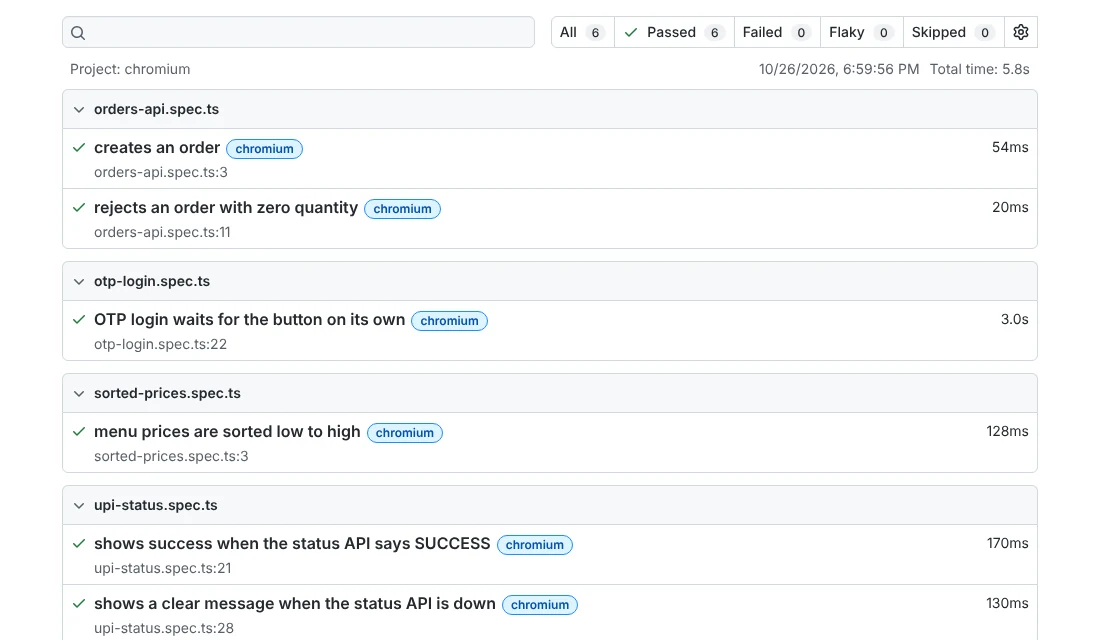
Common mistakes in Playwright interviews
- Saying “I add waitForTimeout to fix flaky tests.” This tells the interviewer you have not understood auto-waiting. Talk about waiting for a condition instead.
- Reaching for XPath first. It works, but it signals old habits. Start with role, label and test ID locators, and explain why.
- Treating retries as the fix. A retry only hides a flaky test. Say how you would find the cause using the trace.
- Learning syntax without the reason. Many candidates can write
storageStatebut cannot say why the file must stay out of Git. - Claiming one tool is “the best”. Interviewers prefer “it depends, and here is how I would decide” with a real reason.
What the official docs say
The answers above follow the Playwright documentation for version 1.64. The Auto-waiting page lists every check Playwright runs before each action. The Locators guide sets the recommended order of locators and explains strictness. The Retries page defines passed, flaky and failed. For speed and scale, read the Parallelism and Sharding guides, and for new features the release notes. Where we gave an opinion, such as on page objects or the mock-to-real-API ratio, we said so.
Frequently asked questions
Is Playwright a good tool for freshers to learn?
Yes, if you already know basic JavaScript or TypeScript. Playwright waits for elements on its own, comes with its own test runner and reports, and has clear documentation. That lets a fresher focus on what to test instead of setup problems. Practise with small tests first, then add fixtures.
Which language should I use for Playwright interviews?
Check the job description first. Playwright has official versions for JavaScript/TypeScript, Python, Java and .NET. When you create a new project, Playwright suggests TypeScript by default, so it is a safe choice. If the team already writes Java or Python, use that, because interviewers usually test in the language of their own codebase.
Should I learn Selenium or Playwright first?
It depends on the jobs you are applying for. You will see both in job posts, and many long-running projects have years of Selenium tests. The testing ideas are the same in both: good locators, waiting for conditions and independent tests. Learn one well, then the second one takes much less time.
How do I prepare for a Playwright coding round?
Practise small tasks without copying code: fill and submit a form, check a sorted list, mock an API response, and read values from a table. Speak while you type, because interviewers judge your reasoning as much as the code. Run each test, read the output, and be ready to explain every line.
Do Playwright interviews ask about new features?
Sometimes, especially in senior rounds. You are not expected to know every release, but one or two recent changes show you actually use the tool. Recent examples are Test Agents in 1.56, isolated retries in 1.62, test locks in 1.63 and locator.within() in 1.64.
What to practise next
Take the five sample files, break each one on purpose and read the error Playwright gives you. That habit answers half the debugging questions above. Then test yourself with our timed QA practice tests, go through the interview prep questions, and browse more career guides in the QA Career & Interviews section.
Sources
- Playwright – Installation (docs, v1.64, 2026)
- Playwright – Auto-waiting (docs, v1.64, 2026)
- Playwright – Locators (docs, v1.64, 2026)
- Playwright – Assertions (docs, v1.64, 2026)
- Playwright – Timeouts (docs, v1.64, 2026)
- Playwright – Isolation (docs, v1.64, 2026)
- Playwright – Mock APIs (docs, v1.64, 2026)
- Playwright – Fixtures (docs, v1.64, 2026)
- Playwright – API testing (docs, v1.64, 2026)
- Playwright – Authentication (docs, v1.64, 2026)
- Playwright – Parallelism (docs, v1.64, 2026)
- Playwright – Retries (docs, v1.64, 2026)
- Playwright – Sharding (docs, v1.64, 2026)
- Playwright – Trace viewer (docs, v1.64, 2026)
- Playwright – Playwright Test Agents (docs, v1.64, 2026)
- Playwright – Release notes, versions 1.56 to 1.64 (2025–2026)
- Selenium – WebDriver (docs, 2026)
Tools and features change often. Check the official documentation for the version you are using.